My First iPhone App!

Several months back I toyed with the idea of porting my audio cassette music player to iPhone using Flash Professional CS5’s iPhone Packager, and as you can see from the video below I’ve done just that. Although Apple are blocking content written in Flash from the App Store I still thought it would be a worth while exercise and would probably be fairly straight forward to do.

Well it turned out to be anything but straight forward. The wisest Jedi of them all once said “You must unlearn what you have learned” and I swear the more that quote floats around my head the more convinced I am that Master Yoda had actually tried porting projects to Apple’s shiny little wonder.

I naively thought that my Flash Lite experience would ensure I was up and running in no time at all. However writing for iPhone brings about a whole new set of interesting problems for the developer to solve. I’ve spent the last two days taking apart my original audio cassette demo and reconstructing it so as best to take advantage of the iPhone’s hardware.

Its GPU loves texture maps, so converting as much of your content as possible to bitmaps and caching them on the GPU seems to get some pretty good results. As is the case with all mobile development, finding the best approach may require you to make compromises and small sacrifices in order to get the best performance.

I think the end result was worth the effort and I now understand considerably more about development for iPhone.
Exciting new features for Device Central CS5

I’m a big fan of Adobe Device Central and have been using it over the years on various mobile projects. It really was a lifesaver when porting my GamesFlash project from S60 3rd Edition smartphones to the mass market Symbian Series 40 handsets. With their limited CPU and memory constraints, every byte saved mattered and optimising in order to gain maximum performance was critical.

Device Central’s huge catalogue of devices and its ability to accurately simulate the performance of these devices made it possible to test my code without having to spend a fortune on hardware. The Memory Inspector was an ideal way to check if my code was about to blow the heap on any one device, and was great for identifying areas of code that were consuming too much RAM.

However there have been some glaring omissions that Adobe are thankfully rectifying in Device Central CS5. For the first time you’ll be able to actually use the Flash debugger when running content within the device emulator. It’s hard to believe this feature wasn’t made available sooner but I’m delighted that it is finally making it into a release. The other great feature I’m looking roman forward to is the ability to emulate a device’s on-board accelerometer.

Take a look at the two videos from Adobe Platform Evangelist Mark Doherty as he gives a guided tour of some of these new features.

Online Flash Lite Packager is back!

Great news folks. Forum Nokia’s Online Flash Lite Packager is live again. To be honest I was starting to fear the worst but true to their word the boys and girls at Forum Nokia have wheeled out a new version.

So if you fancy converted any of your existing Flash projects to Flash Lite and selling them on Nokia’s OVI Store then now is the time. With OVI Store available to Nokia users in over 180 countries there’s the potential to generate some serious revenue. Now I just need to think up a good idea and I’ll be driving around in that Ferrari that I’ve always wanted.

Fight: Flash Player 10.1 v HTML 5

Here’s a video I’ve been meaning to post for a few weeks now. It shows performance comparisons for Flash Player 10.1 against HTML 5 across both the Mac and the Google Nexus One. In order to perform the test a simple particle engine was written that was easily translatable between ActionScript and Canvas. The tests weren’t actually restricted to Flash and HTML 5, with versions of the particle engine also being written in HTML and SVG.

The short answer is that Flash is still king but the other technologies, in particular Canvas, were catching up. Of particular interest was Flash Player 10.1’s performance on the Google Nexus One. The HTML 5 demo on the Nexus One was managing approximately 13 frames per second while the same demo running in Flash was hitting between 26-28 frames per second. Even running in Safari on the Mac the Flash demos outperformed the same HTML 5 demos.

All very interesting but admittedly the tests are hardly the most scientific. If you’re interested then jump over to Michael Chaize’s blog where you can find out more.

Flash for Android

It’s getting closer. The first public betas for both Flash Player 10.1 and Adobe AIR 2 for Android are almost upon us. If you’re interested then sign-up to be notified via the Flash Player 10.1 or Adobe AIR 2 beta pages. It’ll be interesting to see what the performance is generally like when browsing Flash content. Devices such as the HTC Desire have a 1 GHz CPU and should allow Flash to take advantage of GPU acceleration too, so fingers crossed that Flash Player 10.1 will perform respectably on mobile.

As for Adobe AIR 2.0. I think this is a really exciting opportunity for Flash developers to get their games and applications onto Android. If the video above is anything to go by then the performance looks pretty impressive. As you no doubt know, Adobe have been working very closely with various handset manufacturers to ensure the best possible experience for the end user.

Has Apple just nuked the Flash iPhone Packager?

So Apple has just changed its developer agreement for those wishing to access the iPhone Developer Program and it could spell the end for Adobe’s iPhone Packager before it has even been released. Here’s the worrying snippet:

3.3.1 Applications may only use Documented APIs in the manner prescribed by Apple and must not use or call any private APIs. Applications must be originally written in Objective-C, C, C++, or JavaScript as executed by the iPhone OS WebKit engine, and only code written in C, C++, and Objective-C may compile and directly link against the Documented APIs (e.g., Applications that link to Documented APIs through an intermediary translation or compatibility layer or tool are prohibited).

With Apple and Adobe not exactly being the best of friends at the moment it is very possible that this is another blatant attempt by Apple to make Flash irrelevant. Unfortunately these new terms and conditions would also have serious implications for the excellent Unity development platform too.

Fingers crossed it’s just a big misunderstanding.

Flash: One Web. Any Screen.

Well that’s the impression Adobe are trying to give with this pretty neat video that I spotted on Mark Doherty’s blog.

It’s not quite there yet but with the arrival of Flash Player 10.1 expect to see Flash on most tablets and many of the smart phone’s coming to market.

Improving Flash performance on Mac

Poor performance is probably one of the biggest complaints regarding Flash on Mac, but is anything being done about it or was Steve Jobs correct when he accused Adobe of being lazy?

Well after reading a post from Tinic Uro, an engineer working on the Flash Player, it seems that both Adobe and Apple have been feverishly working together to bring a faster Flash Player to the Mac.

What the Frak?! Apple working with Adobe! Yup, seems that Flash support for the Core Animation drawing model was originally driven by Apple and has had engineers on both sides working towards improving Flash performance on Safari.

For those that don’t know, Core Animation is an Objective-C framework that provides a high-performance compositing engine and animation API.

And for those wondering just how much this change will benefit Mac owners, the Adobe engineers believe they will get to the point where Flash Player for Mac will actually be faster than Windows for graphics rendering. For video rendering they expect to reduce the CPU usage on Mac to the point where it is almost identical to PC.

You can read Tinic Uro’s original entry on his blog and you might also want to check out this post from him explaining some of the performance gains.

AS3 iPhone Components

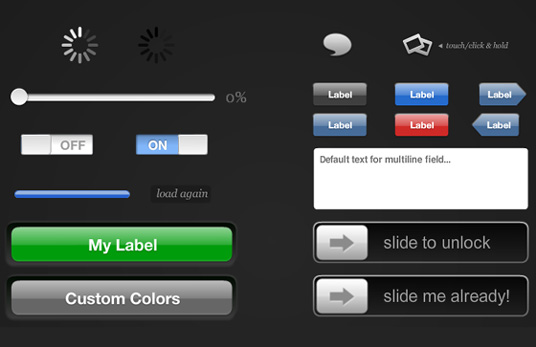
Pop over to NoRestForTheWicked and you’ll find a set of nifty ActionScript 3 iPhone components by Nick Jonas. He’s decided to start small but what’s there looks great and should come in handy for anyone wishing to prototype potential iPhone UIs in Flash or for those simply wanting to get a head start with their Flash CS5 Professional iPhone projects.

Currently the SWC comes in at a tidy 72 Kb and the components themselves can be added to your project using only a few lines of code. In fact, from his site you can preview the components and even click on a link next to each to generate the code required to set it up; it really couldn’t be simpler. You won’t be able to use any of the iPhone’s native UI components from within Flash so Nick’s components will no doubt be a lifesaver for many.

Flash Lite 4

Spotted an interesting article on Scott Janousek’s blog stating that Flash Lite 4 is now available from Calsoft, one of Adobe’s partners responsible for getting the Flash Lite run-time working across various chipsets.

So why another version of Flash Lite? Isn’t Flash Player 10.1 for mobile going to make Flash Lite redundant?

Well not quite yet. Given the minimum device spec (order of a minimum of 600 Mhz ARM11) required to run 10.1 it’s going to be some time before there’s significant penetration across a wide range of devices. Plus whereas 10.1 is a browser only plug-in, Flash Lite 4 is both standalone and a browser plug-in.

So while developers can get to work straight away writing Flash Lite 4 applications and games for various distribution channels, those wishing to target Flash Player 10.1 will need to wait for AIR 2.0 to roll out across mobile.

Many may look down on Flash Lite as nothing more than a stunted version of Flash 10, but it makes a lot of sense for those wishing to write apps quickly or for those who simply want to port their existing web based games to mobile with minimum fuss. Its support for ActionScript 3 should make porting significantly easier than before where many developers would previously have had to actually re-write their code in ActionScript 2.

Outside Japan, Flash Lite doesn’t seem to have had the success Adobe would have hoped for. It’ll be interesting to see if that changes with Flash Lite 4.