Adobe CS5 Road Show

Edinburgh is such a beautiful city and was an ideal location for the first stop of Adobe’s CS5 Road Show. It gave me the opportunity to appreciate some great architecture as well as feasting my eyes on the new features that have made it into CS5’s range of products. Being primarily a developer I tend not to focus that much on the more design orientated tools so Tuesday was a great opportunity just to catch-up on some of the CS5 products.

Of course, it doesn’t matter how many times you see it in action, Photoshop’s new content-aware fill feature is simply amazing and Adobe’s representatives were eager to show it off as often as they could during the day. Dreamweaver was another that had a lot of interest at the event and with its support for HTML5 I thought it would be a good one to check out. It didn’t disappoint and is something I might try and tinker with if I can find the time.

Adobe CS5 Edinburgh Road Show

The highlight of the day however was Mark Doherty’s session where he demonstrated Flash Player 10.1 running on the Google Nexus One. It was great to finally see 10.1 running on a mobile device and I did manage to actually get some hands on time with the hanset at the end of the session.

The performance was reasonable but Mark informed me that the current beta build actually had hardware optimisation disabled due to a last minute bug just before the announcement at Google IO. It’ll be interesting to see just what can be achieved once the issue is ironed out and hardware acceleration is switched back on. This might also explain the really bad performance we’ve been seeing in some videos on the web.

One thing that niggled me, and I’ve constantly noticed this in videos of 10.1 on the web, is the difficulty Mark had trying to focus on and sending the Flash content into full screen mode. Again I quizzed him on this and he put it down to the Flash Player 10.1 engineers changing how this feature works between builds. Fingers crossed that this usability issue gets resolved as it doesn’t seem that intuitive at the moment and actually gives the impression that 10.1 is broken.


Oh and although I enjoyed myself I do have two serious complaints to make. Firstly there were no free t-shirts to be had anywhere. The Dot Net developers at work always get free t-shirts when they go to events and used my t-shirt misfortune to deride me and mock Flash in general. Secondly the cool badges that were being given out during registration – why weren’t there any Flash badges? Don’t get me wrong, the Fireworks badge I ended up with was pretty good but wearing it didn’t let others know at a glance what a complete Flash fan boy I am 🙂

If anyone at Adobe is reading this, please send me a medium t-shirt with a huge Flash logo on it and a few Flash badges that I can pin on the foreheads of my Dot Net loving colleagues. Thanks!

Flash: A Victim of its own Success?

This year’s Google IO event was pretty exciting, especially for those interested in the future of Flash. It has certainly been a long time in the making but Flash Player 10.1 finally made its public appearance on Android 2.2 devices, promising to bring the ‘full web’ to mobile. If that wasn’t enough, Adobe also revealed the availability of the public beta of AIR 2.5, enabling developers to create apps for Android 2.1 devices and above.

But whereas official videos from Adobe (see video above) and Flash Platform evangelists show 10.1 running beautifully on devices such as the Google Nexus One, other sources on the web are quick to show their Android devices nearly chocking to death while playing Flash content. One article in particular from Mobile Crunch entitled ‘Flash kills browsing in Android 2.2 Froyo‘ (see video below) shows a particularly poor user experience while scrolling around pages that contain multiple Flash instances.

The video’s presenter went as far as stating that he felt that the current beta of Flash Player 10.1 wasn’t quite there yet and the sluggish performance was perhaps due to 10.1 still being quite buggy. In fact, he suggested that you uninstall Flash Player 10.1 since in his opinion ‘it’s just not ready yet’ and ‘really slows down page scrolling and page loading’.

So is Flash Player 10.1 for Android really buggy? Are Adobe’s Flash Player engineers just lazy? Is Flash just too slow to ever run well on mobile? Well I believe that the answer to all three questions is no, but I do feel that the issues we are seeing are mostly due to Flash’s phenomenal success over the past decade. It’s the Flash content that users are trying to run that’s more likely to be the problem rather than anything fundamentally wrong with Flash Player.

You see, as Flash developers we’ve had it too good over the years. Be honest, how many of you guys out there ever write Flash content with CPU or memory consumption in mind? Until now we haven’t had to. Desktops have been easily good enough to handle almost anything we’ve thrown at them over the years. Running low on memory just isn’t an issue on a desktop and Flash’s software renderer can run quite comfortably on even a modest PC.

Unfortunately this has led to increasingly bloated Flash content over the years that soaks up system resources without caring about the consequences. Banner ads are perhaps the worst for it. I’m convinced those who create Flash banners have some sort of competition going to see who can consume the most system resources. To make matters worse, sites that serve these banner ads tend to display several of them at once, requiring multiple Flash Player instances, which further impacts performance. If you need proof, just head over to any site that contains Flash banners ads and check the CPU usage. I bet your desktop’s CPU is close to melting.

In the face of the continuing HTML5 v Flash debate this post possibly makes for distressing reading. We’re constantly seeing great HTML5 experiences that run not only on desktop browsers but quite comfortably on mobile too. Does this mean that HTML5 and JavaScript perform better on mobile? To be honest that’s difficult to say for sure and really depends on whose performance metrics you look at.

For Flash to succeed on mobile we need a new mindset from Flash developers. We need to learn to optimise for mobile. To find as many ways as possible to write content that runs just as well on mobile as it does on desktop. Those with Flash Lite experience will already have a head start and I’m sure many Flash Lite developers will tell you that it’s not really that difficult. It just takes a little discipline and some common sense. Experiment and try to keep your display lists as flat as possible.

Trust me it will be worth the effort and your reward will be the additional traffic your site will receive from mobile visitors surfing on their Flash 10.1 enabled handsets. It doesn’t have to start with new content either. Spend time optimising your existing Flash content and if your site also serves Flash banner ads you might want to consider removing or replacing them with static images for mobile visitors. It’ll improve the user experience and ensure that the Flash content you really want the users to see runs without a hitch.

If you’re serious about your user experience and want to increase traffic to your site then get your hands on a few Android 2.2 devices and keep testing your content on them. Going forward there really is no excuse for writing Flash content that performs badly on mobile and continuing to do so would be a disservice to the platform we’ve all grown to love over the years.

Glasgow Flash Meetup

Well Friday night was something special. The greatest minds in the Glasgow Flash community met up to discuss all things Flash related and to have a good ol’ iPhone bashing session. But wait a minute, it turns out that even Flash devs are divided by all this Flash v iPhone malarkey. Incredulously some even seem to think that Steve jobs is right to ban Flash from the iPhone! What the frak! The night nearly ended-up in fisty-cuffs I tells ya. Oh and a special guest from Finland turned up too, but let me introduce everyone first.

So who are all these brilliant individuals? Well the group was kinda split into two camps – actual Flash developers (myself, Lindsey, Jamie and Dave), and special hardcore mobile Flash Player developers (Alex, Cameron, and Dave again). You mean to say you had actual C engineers from Adobe at Glasgow Flash Meetup? Well not exactly. You see these clever dudes used to work for a company who built their own Flash player for mobile even before Macromedia released Flash Lite 1. Pretty cool huh?

Jamie shows off his Palm Pre and bitches about Flash.
To be honest, all the individuals I’ve mentioned are so good at what they do it makes me sick, but I’m gonna try and not hold it against them, and actually sing their praises a little. Let me start with Lindsey and Jamie. You see they’re both super special because unlike most people they’re pretty amazing coders and artists. What you don’t believe me? Well take a look at Lindsey’s gallery then, and this photo of an amazing painting Jamie did of a cheeseburger sitting on an Atari ST. If you take a look at the comic strips in this post you’ll realise that Jamie is a bit of a loose cannon but please don’t hold it against him.

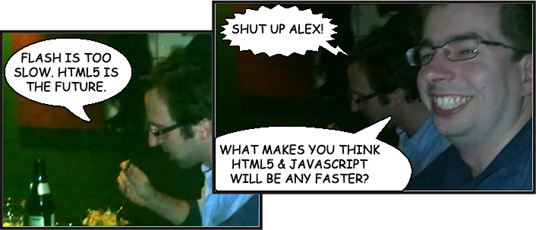
What makes you think HTML5 and JavaScript will be any faster?
Now onto the C engineers. Well Alex still works for the same company that produced the Flash Player and he’s also currently working on an XBox game in his spare time. I honestly think Alex must be the best C coder in the world. In fact I barely understand a word he says, mostly because I think he actually talks in C rather than English. Cameron too is a C guru who loves registering great domain names (his latest is a cracker) and dreams of stealing money from cash machines.

Jamie goes a bit mental.
Finally there’s the enigma known as Dave. I could write several pages about Dave (in fact I did just that once) but this quick paragraph should suffice. Dave is an Apple fan boy and can code in almost any language. For several years he worked as a C engineer with Alex and Cameron writing a Flash player. His career took a turn for the worse when he started sniffing glue. Before Dave knew it, his life was out of control and he found himself reduced to coding in ActionScript. Even today he works full-time as an ActionScript 3 developer, but secretly dreams of the day when Steve Jobs successfully purges the planet of Flash.

Flash rocks!
It was a good night. Jamie and Lindsey had a big argument about Flash on mobile. I tried to stay impartial, as did Dave. Later on Jamie went a little crazy and started talking about killing animals or something!? The whole Flash on mobile/iPhone debate was very interesting. Jamie seemed to think that running Flash on mobile was simply impossible. Others argued that HTML5 and JavaScript on mobile wouldn’t be any faster than Flash. Personally I passionately believe that there is a place for Flash on mobile so it was good to see Lindsey fighting in my corner.

The night was made extra special by the appearance of a guest of Jamie’s who’s currently working for Nokia. I seem to remember loud music, lasers and pyrotechnics going off as he entered the room. But then again that might just be my mind playing tricks – I do like my Nokia phones. It was kinda like being in the same room as a rock star so it took me a while to pluck up the courage to talk to him. Glad I did though coz the dude had some pretty interesting things to say. For liking Nokia so much he installed a secret app on my phone. It turns any photographs you take into comic strips complete with speech bubbles. Pretty sophisticated stuff don’t you think? Sure did come in handy for this post.

Behaviour Driven Development

My favourite presentation at this years DDD Scotland was Steve Sanderon’s “Getting Started with Behaviour-Driven Development (BDD)”. No don’t close your browser! This is gonna be a good post, honest.

So what the heck’s Behaviour-Driven Development then? Well funnily enough Steve doesn’t pretend to be an expert on the subject, going as far as stating that he’s not sure you’ll find an accurate description of BBD anywhere.

No no no don’t go! I’m not kiddin’ you’ll get something out of this one, just hang on in there, because to be honest I think our presenter here was being a tad modest. He seemed to really know what he was talking about and I’m going to try and summarise below (in other words rip content directly from Steve’s blog). Here goes.

BBD is really a refinement of Test Driven Development (TDD). As Steve pointed out, TDD has an unfortunate name since it is more useful as a code design aid rather than as a technique for testing code and finding bugs. Perhaps it’s biggest problem is that too many developers struggle to break free from a test-oriented mindset, investing time writing and maintaining masses of unit tests that execute every code path without really aiding design or detecting bugs.

Behaviour Driven Development however puts the emphasis on specifying behaviours that can be understood by non-programmers. It extends TTD by writing test cases in a natural language that anyone can read. BBD asks you to elevate your mind to a level of behavioural abstraction above the code implementation. This change leads to the writing of more beneficial specifications.

Although you can write BBD-style specifications for individual code units, it seems that it’s particularly useful when writing specifications for UI interactions. Your specification should make it clear in high-level terms what the application should do and is typically written in a natural language such as Gherkin. Behaviours consist of simple sentence fragments that are written in terms of “Given, When, Then”. Here’s a sample specification written in Gherkin.

Feature: Signing In
     In order to participate on WeeWorld
     As a user
     I must first sign-in to the site

Scenario: Sign-in
     Given I am on the WeeWorld home page
     Then I should see a button labelled "Sign in"
          And a field labelled "Username:"
          And a field labelled "Password:"
     When I enter "test" into the "Username: " field
          And I enter "password1" into the "Password: " field
          And click the button labelled "Sign in"
     Then I am redirected to the home page for the user named "test"

Scenario: Viewing user's home page
     Given I am on the home page for user "test"
     Then I should see a text field labelled "Hi test!"
          And I should see a link labelled "Sign out"

Pretty neat eh? Well that’s the easy part. The final step is to actually write some code to test our business rules. There are tools available (SpecFlow for Dot Net developers and Cucumber for those using Ruby) that take your Gherkin specification and generate a test fixture containing a test method for each of your scenarios. It’s then the task of the developer to start writing test code to verify each of the scenarios. This code will usually take advantage of automation tools such as WaitN or Selenium for integrating your tests with web browsers.

And that’s more-or-less Behaviour Driven Development. Of course if you want to know more I suggest you pop over to Steve Sanderson’s blog where he does a much better job of explaining all this, and gives some examples of code that is written from each of the scenarios. To be honest I couldn’t be bothered going that far 🙂

Okay, you can remove the match sticks from your eyes now.

Oh and if you’re a Flash dude then you might want to take a peek at ASSpec which is a free and open-source behaviour-driven development framework for ActionScript 3. Although to be honest I haven’t really spent any time looking at it myself so it could very well be rubbish.

Writing Software is Easy, Not Going Bust is Hard

If you guys will allow me I think I’ll talk about something other than Flash today. No I’ve not lost my marbles but there are a few other sessions from last weeks Developer! Developer! Developer! event that I’d like to talk about.

Both Liam Westley and Steve Sanderson presented sessions that were real eye openers for many attendees. What I found most interesting was that a lot of what they had to say was simply common sense. Unfortunately geeks tend not to apply common sense instead burying themselves in code or sticking to procedures that they’ve grown comfortable with.

Liam’s “Writing Software is Easy, Not Going Bust is the Hard Part” was a breath of fresh air with technology and frameworks being completely avoided. Instead the focus was on testing, logging, time/cost estimates, paperwork and sales pitches. I guarantee all attendees at one point or another during the hour felt slightly embarrassed when they realised that they (or their company) weren’t actually following many of simple practices outlined by Liam.

Things didn’t start too well for us. “Your goal as a software company is to create software that never causes that support phone to ring”. “Every time the phone rings you bleed cash”. MacDog was sweating by this point as he desperately fumbled about in his pocket trying to switch our support phone onto silent mode. Phew disaster averted. The talk then moved onto error reporting and logging, where again there were some great points for us to follow-up on.

Later on we covered the more mundane but no less important, with Liam going as far as suggesting you should eject people from meetings who haven’t bothered reading the documentation beforehand. Again, it’s common sense really as it leaves only those who are actually prepared and ultimately leads to a more productive meeting.

For me, his best tip was to always try and be the guy that gets to write the minutes. Why? Simple, no one bothers to read them and what is written in them tends to get set in stone. As Liam said, “Victory goes to those who write the minutes”.

As a company I think the processes and procedures we have in place at WeeWorld are extremely good, but it’s clear that there is still room for improvement. There are a few great things we took away from the session that we plan to discuss and take further. But what I found most interesting from the session was that much of what was said focused on just the small day-to-day tasks that everyone and every company has no reason for avoiding. It’s really all about discipline and a dash of common sense.

I strongly suggest you watch the video above of Liam’s presentation and take the time to read over his presentation slides complete with speaker notes.

I’m gonna talk a little about Steve Sanderson’s brilliant “Behaviour Driven Development” next time and then I promise I’ll get back to feverishly talking about Flash.

Android 2.2 running Flash 10.1

Here’s a great video showing Flash Player 10.1 running on the Google Nexus One. The performance looks to be pretty impressive across the range of sites shown. I was actually blown away by how good The Eco Zoo ran on the handset as it showcases 3D content, something Flash isn’t particularly renowned for. The demonstration also visits a few video heavy sites showing Flash Player 10.1 also alerting viewers whenever video content that wasn’t web optimised had been selected. The video would still play but the user was effectively warned that it may impact battery.

All the sites on show seemed to perform reasonably well but of course, as is always the case with such videos, everything is carefully hand picked. It’ll be interesting to see how many sites actually run when Android 2.2 is released. It’s becoming clear that if you want Flash on mobile you’ll be looking at devices with CPUs around the 600 MHz – 1 GHz mark.

I had been wondering why Nokia’s upcoming flagship devices such as the N8 only support Flash Lite 4. Upon checking the N8’s spec it became apparent that its CPU was clocking in at 680 MHz. Too slow for Flash Player 10.1 or is it going to arrive a little later on these devices? I have seen 10.1 running on the N900 (see video above) so it would be surprising if it didn’t appear on the S60 devices. Either way I’m delighted to see the full Flash experience on mobile and nearing release. Flash Player 10.1 could very well give me the reason to move from Symbian to Android.

Developer! Developer! Developer!

Upon arrival at this year’s Developer Developer Developer event I knew I was going into the hornet’s nest. It’s not easy trying to go unnoticed at these things you know, especially when you’re the only Flash developer there amongst a crowd of several hundred soulless dot net geeks. Somehow they can just tell you’re different, as this poor Flash developer found out to her cost at last year’s DDD event.

Desperate to avoid a similar fate I enlisted the help of a few dot net peeps I work with who were also going along and who promised not to alert the others to my presence. Basically MacDog told me the best way to fit in was to go unwashed for a whole week and then make snide remarks on the day whenever anyone mentioned Adobe or Flash. He’s been following this code of conduct for several years now and it seems to be paying off for him, although he does have to keep the windows open at work to get rid of the smell.

His advice worked and if the truth be told I kinda got more into it as the day progressed, even randomly adding in some guttural barks and yelps of delight whenever anyone mentioned HTML5.

In fact first up on the day was Craig Nicol with HTML5: The Language of the Cloud? He gave a whirlwind tour of some of the new features of HTML5 including Canvas support and video playback. Of course just about everything he demonstrated had a list of caveats attached to it and the demonstrations on offer weren’t anything I hadn’t seen before, but it was a good presentation and served to highlight the many great things we can expect from HTML over the next few years.

I’m hoping to find some time to tinker with HTML5 at some point, it’s just a pity I’m going to have to go back to using JavaScript rather than ActionScript 3. I remember the dark days of ActionScript 1 and find it quite startling that web browser implementations of JavaScript have barely evolved.

By far the most entertaining presenter on the day was George Adamson. His session was billed as a fast-pace introduction to JQuery and he promised to avoid boring slides. Well George kept his promise and delivered the best introduction to JQuery you’re likely to see in under 30 minutes. For those Flash devs who don’t know, one of the many things JQuery can do is let JavaScript developers create cool programmatic animations in a very similar manner to APIs like Tweener and Greensock.

So why the heck am I telling you all this? This is a Flash blog right? Well of course it is, but the simple fact is that as HTML5 continues to standardise, many of the tasks that would normally have been done in Flash will most probably be implemented in HTML5 and JavaScript. But whereas the very mention of HTML5 or Flash seems to polarise people I say let’s embrace all these technologies. As developers we shouldn’t be picking sides, rather selecting the correct technology for the job.

As a Flash developer my skills are transferable. I know ActionScript inside out and I’ve been using tweening engines such as Tweener and Greensock for some time. Working with HTML5 video and rendering pixels to the Canvas shouldn’t be that difficult. So to everyone out there in the Flash community, embrace HTML5. Let’s flood the web with HTML5 version of the banner ads we used to do in Flash and watch as everyones browser slows to a crawl. It’ll be no time at all before everyone is banging on about how slow HTML5 is and how all it’s good for is producing banner ads. Before long they’ll come flooding back to Flash 😉

Seriously though, I really enjoyed DDD and hope to be back next year (if they’ll have me back after this post that is :-)). A big thanks to all the presenters and to Glasgow Caledonian University for hosting the event.

iPhone Packager: Smooth Scrolling

Just thought I’d share a video of an iPhone app that I considered developing using Flash Professional CS5’s iPhone Packager. Of course I won’t be able to publish it to the App Store due to changes in Apple’s developer agreement but I still thought it would be interested to throw together a very rough prototype and see how it performed.

Well as you can see, even on my trusty old 1st gen iPod touch, I managed to achieve a more than acceptable frame rate using Flash. You can swipe horizontally to swap between a set of vehicles, or scroll vertically to change the skin of the current vehicle.

Okay, it’s hardly rocket science but there have been a lot of rumours going around of late that it’s almost impossible to get a decent frame rate on iPhone using Flash. That’s simply not true, but you do have to remember that you’re developing for a mobile device, which nearly always requires you to make special design and coding considerations.

Tutorial for those living in a parallel universe

Good news folks! If you use Flash and live in an alternate reality where Apple and Adobe get along just fine then you’ll probably find this tutorial quite useful. It details how to get the best performance when writing apps with Flash CS5 Professional’s Packager for iPhone.

I suppose for everybody else there’s nothing stopping you using Flash to quickly prototype your apps before committing to Objective C. What’s written in my tutorial will also benefit those wishing to target the Android platform and shows how to take advantage of a device’s GPU to increase animation performance.

Sure glad I only spent 5 minutes putting the tutorial together. It would have been quite irritating if I’d spent a few weeks on it only to find out Steve Jobs had changed the developers license agreement rendering all my hard work useless.

So anyway, here it is:

Packager for iPhone: Render Performance

Introduction

CS5 is one of the most eagerly anticipated releases of Flash Professional in years and the inclusion of the iPhone Packager finally makes it possible for Flash developers to write exciting content for iPhone using the same tools they use day in, day out.

Mobile development requires special design and coding considerations, and the iPhone is no exception. Although the Packager compiles all ActionScript byte code into native iPhone application code, an understanding of the Flash rendering pipeline on iPhone will help you maximize performance.

This article will lead you through code examples detailing how to get the best results from your iPhone when performing frame-based animation.
Continue Reading