BAFTA Play

BAFTA Scotland recently hosted an evening showcasing Scottish games talent, and I took the opportunity to pop along and see what was on offer. There was a really diverse selection available to play, including award-winning games from the 2013 Scottish Game Jam and the BAFTA Scotland New Talent Awards. I was struck by the innovation of some of the games, and also the ambitious scope of others. Considering many of these games started life as quick prototypes hacked together for a 48-hour games jam, I couldn’t help but be impressed.

I forgot to take photos of any of the games so you'll just need to make do with a pic of yours truly instead.

My favourite game of the night however was probably conceptually the simplest. Lub vs Dub is a minimalistic two player game with both players holding onto the same iPad and facing each other. Essentially the screen is split in two with both players racing to be the first to collect a target number of hearts. It’s essentially a multi-player endless runner with a nice power-up mechanic. I spent a good amount of time playing it and chatting to developer Greame McKellan, who described Lub vs Dub’s beginnings from a series of rapid prototypes to its current incarnation. There’s still some work to be done and the team are eager to include a single player mode too, but it’s shaping up nicely.

All in all, it was a great night and it has really put me in the mood for taking part in a future games jam. You never know it might actually encourage me to actually finish one of my game ideas.

Pixi JS Rocks!

I wrote about Starling JS recently, but there are tonnes of similar JavaScript graphics libraries out there that are worth exploring. One that’s got me quite excited is pixi.js, which has a very similar API to Starling and also boasts support for WebGL as well as Canvas.

As a quick test I ported some of my Monster Dash clone over to JavaScript. As you can see from the video above the performance is pretty damn good and of course, with JavaScript, there’s the benefit of being able to target mobile web browsers too. If you’re interested in pixi.js then take a look at this game written by its creators and also take a peek at this really nice demo that shows off some new features that are coming.

Some AIR Mobile Apps

One of the nice things about keeping a blog is that I get contacted by people from time to time asking me to take a look at their apps or pointing me in the direction of other successful apps written in Adobe AIR. Here’s a few that have come to my attention recently.

Picshop Pro

I’ve been meaning to write about PicShop for ages now but for one reason or another never got round to it. Thankfully a reader’s comment recently reminded me about it and the success it has had. PicShop is a simple and extremely easy to use photo editor for iOS, Android, and Blackberry. While it’s primarily aimed at casual users, there’s enough there (including HD image support) for even serious photographers to get something from it.

If you’re in any doubt about whether you can make money from Adobe AIR then take a look at developer Shawn Blais’ blog where he details the financial success of PicShop. As a side note, Shawn now works at TreeFortress Studios who are doing some interesting mobile work with AIR. Take a look at their blog for more details and a bunch of useful code libraries that they’ve been making available.

Creative Creature


Creative Creature is an iPad app that my buddy JP has been working on with Glasgow-based digital agency, Ping. It’s a great little social plaything where you team-up with friends on Facebook to create a creature. You start by drawing a head and pass it onto a friend who then draws the body. They then pass it onto someone else who gets to draw the creatures legs. The nice thing is that each person doesn’t get to see the other parts of the drawing until it’s all stitched together and ready for Facebook. It’s great fun and you’ll be surprised at the mad creatures that come from playing with it.

House Ball


Indie developer Tony Lahood got in touch recently and pointed me towards his latest iPhone game, House-Ball. It’s an addictive little puzzler where you guide a ball of electricity through a city, bringing power back to its homes. Making sure the electricity reaches its target isn’t easy and you’ll need to strategically position and flip switches to help change direction. Also, if you’re not careful, you can actually do more harm to the houses than good. With 100 unique levels there’s plenty to keep you going for hours on end. House-Ball is great fun and an extremely impressive feat for a one-man team.

Yorùbá 101


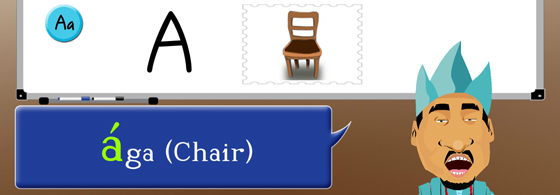
Developer Adebayo Adegbembo from Genii Games sent over his latest kids educational app, Yorùbá 101, which teaches your child the basics of the Yorùbá language. For those who don’t know, Yorùbá is a rich language synonymous to a large section of people from West Africa and the Americas. I was going to say “Adobe AIR Rocks!” in Yorùbá but I clearly need to spend a little more time with the app first 🙂 Nice work Adebayo!

GoTopo


I think of myself as having a good sense of geography but GoTopo by Kick Lensing has shown that to be completely untrue. Available for iOS and Android, GoTopo is a nice little app that has you racing against the clock to answer a series of different topographical questions. New maps and questions are added regularly and there’s even the ability to challenge your Facebook friends. I’m not completely useless however. I did manage to score 12/15 on the “Large British Cities” daily challenge. Thanks for sharing Kick and it’s great once again to see what a single developer can create with AIR.

New Features Coming to Adobe Scout

Adobe Scout is one of the most impressive Flash-related tools to appear in years. So it’s great news to see that Adobe is about to release an update that features support for memory allocation tracking, which was badly missing from the original. You can see a sneak preview in the video below.

While powerful, the sheer volume of profiling information that Scout produces can be really overwhelming. Thankfully Thibault Imbert was on hand at an Adobe MAX session to demonstrate the power of Scout and to help you make sense of all the data. You can find a link to the video here. What’s also interesting is that at the 27 minute mark, Thibault demonstrates an experimental build of Scout profiling HTML and JavaScript. Exciting stuff.

Starling JS

Here’s something I’ve been secretly wishing for for quite some time now. The boys and girls at Gamua just announced that a JavaScript port of their open source Starling gaming framework will soon be made available.

Starling JS will share the exact same API as its ActionScript 3 sibling and will even feel familiar to ActionScript developers who only have experience working with Flash’s classic display list. Interestingly, Starling JS has been written in TypeScript meaning that you’ll be able to take advantage of ECMAScript 6 features and type safety too. Of course, for purists, a vanilla JavaScript version of the API will also be available. One of the nice features of using TypeScript however is that your code will look almost identical to the AS3 equivalent.

The initial release won’t target WebGL but will instead use HTML5 Canvas to render its display list. Seeing as Starling has always been about blazing fast hardware accelerated performance, the use of Canvas as the renderer might make it feel as if Starling’s wings have been clipped slightly but it will guarantee maximum compatibility across desktop and mobile web browsers. In fact, I tried an early Starling JS demo on my iPhone 5 and its performance within Safari was very impressive. Of course, the prospect of having a WebGL powered version of Starling is mouth watering and is something Gamua intend to implement in a future release.

While there’s a plethora of JavaScript graphics libraries already out there, many of them don’t have adequate documentation, decent code examples or an active community. With Starling (and also Sparrow for iOS) there’s already a thriving community and I’m sure we’ll see the same high quality documentation and code samples that developers have come to expect from Gamua.

If you’re as excited as me then be sure to register here for notification of Starling JS’s official release.

Next Generation Flash Professional

Looks like a new version of Flash Professional is on the horizon. Codenamed Hellcat, it has been re-written to take advantage of 64-bit architecture and should be much faster and hopefully more reliable than previous versions.

In the video above, Sr. Product Manager Tom Barclay gives us a first look at it, focussing on the improved launch time, faster common interactions, and the updated user interface. Clearly Adobe aren’t giving much away at the moment so looking forward to more details being made available.

ActionScript 3: The New Bottleneck?

NOTE: If you read this post then please also read the comment at the end from sHTiF (creator of Genome2D) who details some poor assumptions/misunderstandings on my part.

When writing my Monster Dash clone, I opted to start by using Flash’s classic display list. Although my intention was to eventually swap over to the Starling Framework, I knew I’d be able to knock together test animations and do all my graphics layout within Flash Professional much faster than I could programmatically in pure ActionScript. Of course, since I was targeting iOS I knew at some point I’d hit a GPU limit using the classic display list that only Starling (and by extension Stage 3D) would be able to overcome.

The first few iterations went pretty much as expected. Using Box2D I built an increasingly sophisticated game world and quickly added visuals to represent it using traditional Movie Clips and Flash’s timeline. With the help of Adobe Scout I was able to measure the performance of each build and could see that rendering times on my iPad 1 were inching up as I applied more visuals. On the other hand, while GPU rendering was taking up a large proportion of each frame’s budget, my ActionScript was consuming a very small percentage of the allocated budget.

You can see this in the screenshot below, which is captured from Adobe Scout. The vertical slices represents the time taken to render each frame. The green bars represent the time taken to render my visuals, whereas the blue bars represents the time taken to execute my ActionScript. To achieve my target frame rate of 60 frames per second, each slice (a blue bar stacked on top of a green bar) needs to stay below the red horizontal line. If a slice pops up above the red line then my game has failed to perform all the work required of it within its allocated frame budget. When this happens your application’s frame rate drops and the user notices a visible stutter. As you can see from the screenshot, my demo was close to bursting point with my rendering times simply taking too long to consistently stay within budget.
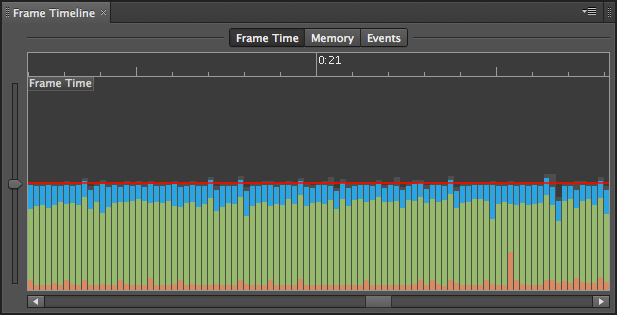
High rendering times (green) but minimal ActionScript (blue) impact.

At this point I knew it was time to ditch Flash’s classic display list and move over to Starling. After all, with my ActionScript execution times already so low (on average around 3ms per frame), I’d surely be able to get my overall frame execution times drastically down by simply plugging in Starling and reducing the rendering times, right? Well, unfortunately by dropping Flash’s classic display list I actually hit a new problem. Take a look at the screenshot below, which was taken from Scout after I’d implemented all my visuals in Starling.
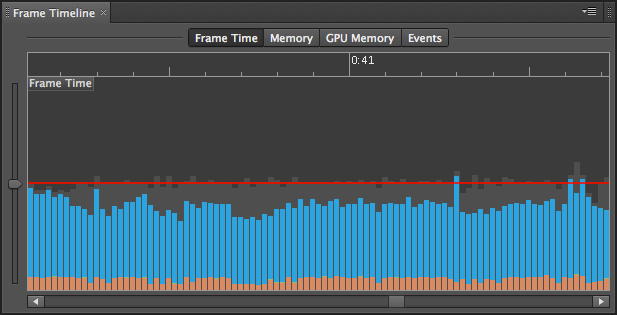
Almost no rendering time (green) but very high ActionScript (blue) execution time.

As you can see, as expected, the green bars are gone! Stage 3D is so blazing fast that the rendering times for each frame are now negligible. However, the execution time for my ActionScript has shot way up (around 14ms per frame compared to 3ms previously)! In fact, my overall frame budget times aren’t much of an improvement over my original classic display list approach at all. But why has this happened? Well, you’ve got to remember that the classic display list APIs are native to the Flash runtime. Therefore there’s almost no cost involved in calling them within your ActionScript. Starling’s API however is actually written entirely in ActionScript 3. Therefore each equivalent call to the Starling API results in layers of ActionScript being executed before the bulk of your graphics work is offloaded to the GPU.

Thanks to Adobe Scout I was eventually able to optimize things so that everything ran within budget on iPad 1 but I only just managed to scrape it. But the harsh truth is that the GPU savings I made by moving to Starling were almost completely blown away by the ActionScript overhead.

Now this doesn’t necessarily mean I should have just stuck with the classic display list. There were some things I didn’t bother implementing using the classic display list, such as the large scrolling backgrounds (you can see a video of an early prototype using the classic display list here). They would have simply crippled my frame rate, whereas Starling was able to effortlessly handled them. I’d also like to point out that the Starling framework itself isn’t to blame either. With Stage 3D being such a low-level abstraction layer, a fair chunk of ActionScript is required when writing higher-level frameworks that sit on top of it. The same is unfortunately true for all other frameworks built on top of Stage 3D such as Away3D, Feathers, Minko etc.

All this does however highlight that while Stage 3D has eliminated Flash’s previous rendering bottleneck, it has left ActionScrpt 3’s performance badly exposed. In recent years we’ve even come to see ActionScript 3 fall behind JavaScript in terms of performance.

So what can be done about this? Well I guess I could target better hardware. The iPad 1 is obsolete by today’s standards and my iPad 2 is actually able to run my Monster Dash clone without even breaking sweat, but I guess that’s not the point. I think Flash developers should expect to run simple 2D games with some basic physics on even iPad 1 and similar Android hardware at a full 60fps. If I was to add additional complexity to my Monster Dash clone then I’d likely run into performance issues again. I accept that my code was hardly the most optimised I’ve ever written but it certainly isn’t the worst either.

The reality is that ActionScript 4 was going to solve all these issues. Now that Adobe has abandoned these plans it leaves Flash and AIR in an increasingly difficult spot. I wouldn’t mind so much if we were to see some performance improvements to ActionScript 3, but if such plans exist then Adobe are keeping it quiet. However it’s highly likely that ActionScript 3’s roots in EcmaScript/JavaScript simply make it impossible to squeeze significantly more performance from the language.

Personally I think the solution is to make some of the more common frameworks such as Starling native by bringing them into the Flash runtime. Considering the increased focus on Starling development and the constraints of mobile hardware, this makes a lot of sense. When using Starling, the traditional workflow of using Flash Professional disappears somewhat, leaving developers with a more code-centric approach. If that’s the case then many will argue what’s the point of using Flash and ActionScript, especially when alternative languages such as Objective-C or C++ can provide significantly better performance. Even Flash’s claim of being a cross-platform solution has been mostly eroded over the last few years.

While Adobe has taken some significant strides with the Flash platform in recent years there are some areas that need some serious consideration. At this moment in time I think ActionScript 3 performance has to be one of the highest priorities.


Zynga introduce PlayScript compiler and runtime

If you’re one of the many people aghast at Adobe’s decision to abandon ActionScript 4 then you might be very interested in PlayScript. Developed by Zynga, PlayScript is an open-source ActionScript 3 compatible compiler that targets a variety of runtimes to quickly build 3D games for both the web and mobile devices.

In addition to ActionScript support, Zynga has gone that extra mile and created a new language – PlayScript – which you can think of as a spiritual successor to ActionScript 3. PlayScript is derived from both C# and ActionScript 3, and provides all the exciting features of C# including generics, value types, operator overloading, and asynchronous programming. You can even relatively quickly convert existing ActionScript code into PlayScript with only a few modifications.

To make all this work, Zynga created the appropriate bindings for Stage3D, which in turn allows all your favourite GPU-based frameworks such as Starling, Feathers, and Away3D to run without any modification. It doesn’t stop there though. Unlike Adobe AIR, which has limited support for native iOS and Android APIs, PlayScript provides (via Mono) full access to APIs on various mobile platforms. Of course, you can write your own native extensions for AIR projects, but it’s hardly an ideal solution.

The PlayScript compiler also has experimental C++ and JavaScript targets, allowing ActionScript to be run via JavaScript on the Web, or natively on PC and mobile.

But why would you want to use PlayScript? Well it may not be for everyone, and most people might simply be happy working with Flash Player or AIR. Zynga however felt that there weren’t any suitable technologies that allowed them to deliver their games to the web and across a wide enough range of mobile devices.

PlayScript is available on github. It’ll be interesting to see what Zynga produce using PlayScript over the coming months.

Bunny vs. Bunny

As promised, here’s a quick video of our first Bunny Vengeance rapid prototype. For demo purposes I’m using a clone of our hero as the opponent.

I’m still waiting for plenty more animation from Alex, which I’ll hopefully drop-in over the weekend. But for the time being you can see in the video above: a basic punch, a block, and a pretty damn cool charge punch too.

More Bunny Vengeance

So I finally found some time to start coding the Bunny Vengeance game idea that I’d been working on with my buddy Alex. The first prototype will be fairly simplistic but it should give us an idea if it has any mileage.

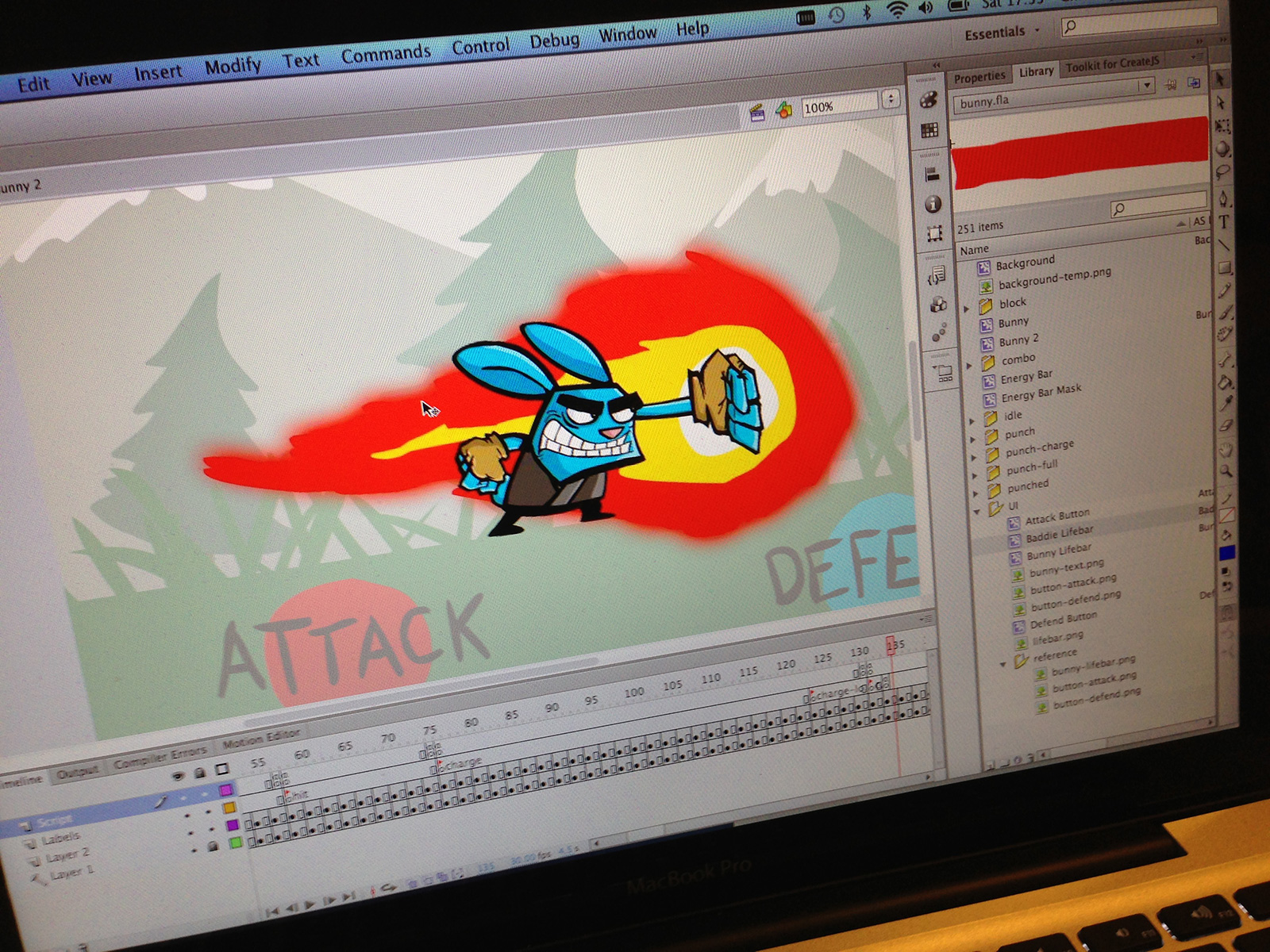
Alex has sent over a tonne of animation and I’m using Flash Professional to quickly throw things together. I’ll hopefully be in a position to show it running on an iPad in the next few days but in the meantime I’ve included a quick screengrab from my Mac above. Doesn’t Alex’s stuff look pretty awesome!