X-wing Targeting Computer

Update: You can find a post about the iOS remake of my X-wing Targeting Computer app here.

I’ve always wanted to be an X-wing pilot, helping the Rebel Alliance in their desperate struggle against the Galactic Empire. Unfortunately we haven’t yet acquired the technology in this galaxy to build reliable and safe X-wing fighters. However I wasn’t gonna let that put me off and embarked on a mission to bring my childhood fantasy one step closer to reality.

Thanks to Adobe AIR for Android and some guidance from the force I’ve constructed a GPS-enabled version of the Targeting Computer found within Luke Skywalker’s X-wing Fighter. So now you can at least pretend to be an X-wing pilot while you’re driving your car.

It’s really simple to use. Just lock in your target location and start driving until you eventually reach the exhaust port, er, I mean destination. Your distance to the target will be continuously updated as you drive and you can even hear radio chatter from your fellow pilots!
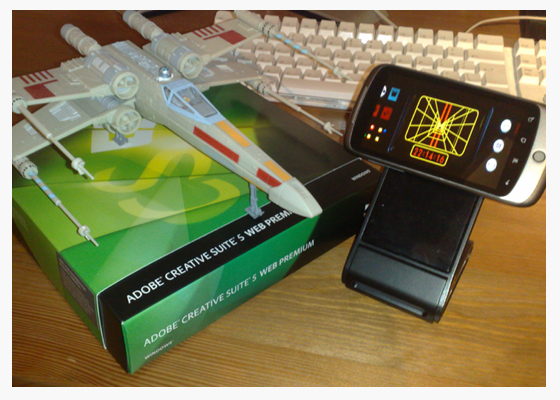
X-wing GPS-enabled Targeting Computer

When you’re not driving why not take your Targeting Computer to the office and use it as a clock. Yup, the Rebel Alliance thought of everything. Just switch it to Clock mode and mount it on your desk to impress the hell out of your friends. You can even set an alarm and watch as your Android phone closes in on the target time.

Now all I need is for George Lucas to spot this post and snap my idea up. George, we could both make a lot of money from this one. What do you say? 20-80 split? 80 percent for me and 20 for yourself. I think that sounds fair 😉

Many Bothans died to bring you this post.
Getting Started with AIR for Android

You’ve probably noticed my posts haven’t been as frequent of late. We’ll it’s all Adobe’s fault! You see I’ve been spending way too much time coding cool stuff for my Google Nexus One rather than blogging. Hold on, actually maybe that’s a good thing.

Anyway, I have managed to finish an AIR for Android app that I’ve been working on and will hopefully be able to post some videos of it in a day or so. In the meantime I thought I’d share some resources I’ve found extremely useful over the last few weeks.

I’m really enjoying AIR 2.5 for Android. Performance is good and the workflow makes coding and deployment easy.

If you haven’t already signed-up for the prerelease program then I’d recommend you do so by clicking this link.

Flash Camp Birmingham

If you missed Flash Camp Manchester then don’t worry. The guys at Flash Midlands have just announced that Flash Camp Birmingham will be held on Tuesday 7th September at Birmingham Library Theatre.

It’s the same deal as before – entry is free and an excellent selection of speakers will be attending including Mark Doherty (Adobe), Seb Lee-Delisle (Plug-in Media), James Whittaker (TweetDeck) and Mike Jones (Adobe). Oh and there will be a prize draw at the end of the day with goodies up for grabs including O’Reilly Books, Flash on the Beach tickets, Adobe Software and SecureSWF Software.

So do yourself a favour and register via this link: http://flashcampbirmingham.eventbrite.com/

Goodbye Symbian. Hello Android

This wasn’t an easy decision. After all I’m supposed to be a Nokia fan boy. However, after much deliberation my trusty wee Nokia 5800 has been put aside and I’m now using the Google Nexus One as my primary mobile.

Anyone who knows me will be well aware that I’m quite enthusiastic when it comes to the Symbian S60 operating system. It’s something I’ve grown comfortable with over the years and has always dictated what phone I get next.

I’ve been tinkering with Flash on mobile since Flash Lite appeared on the scene and Nokia have always done an excellent job of supporting Flash Lite on their mobile platforms. Flash is actually the reason I got my first Series 60 handset and it’s the reason why I’ve stuck with Nokia devices for so long.

However things are changing and Nokia don’t seem to be keeping up. Flash Player 10.1 and Adobe AIR 2.5 have now arrived on mobile and I’ve been desperate to explore both. Unfortunately there’s no sign of Flash Player 10.1 on any upcoming Nokia devices and they seem to be going with Flash Lite 4 in the short term rather than AIR.

So for the time being I’m moving over to Android, where I can get a much more complete web experience and also create cool Flash apps until my heart’s content.

This doesn’t mean I’ve become an overnight Nokia hater or anything. I will be keeping an eye out to see how things develop. The Nokia N8 looks like it could be quite interesting – It’s just a shame its doesn’t support Adobe AIR.

HP Windows 7 Slate

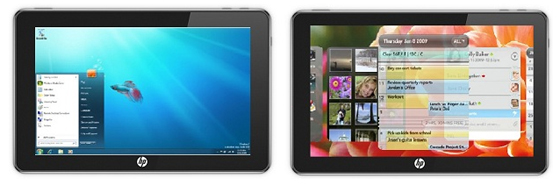
Does it look familiar? Of course it does, it’s the HP Windows 7 slate. It was certainly one of the most promising looking tablets on the horizon and I for one was a little upset when it looked like HP had pulled the plug on the project. Thankfully HP has just announced that it will arrive this fall/autumn.

HP WebOS Slate

It’s a nice looking device and I’m hopeful that they’ve ironed out the usability and performance issues that we were hearing about from those who got their hands on early preview versions of the device. Best of all is that the HP Slate will support Adobe Flash within the browser. Not sure if it will have AIR support but fingers crossed.

Here’s some more info.

Now what about a WebOS version? Now that would be interesting.

UPDATE: Looks like the slate is no longer a consumer products. Thanks to mnem for sending this link.

Flash Mobile Competitions

Flash competitions are like buses. You wait ages for one then three come along at the same time. But hey I’m not complaining and neither should you because three separate competitions simply means three more chances of winning something!

Adobe are really starting to push the Flash platform on mobile and along with its partners is looking for exciting game content that runs on either Adobe AIR for Android or Flash Player 10.1 for mobile. There are generous prizes on offer for each of the contests ranging from cash to software bundles.

Kongregate are offering almost $30,000 in prizes including Adobe CS5: Web Premium for the top 5 entries. Made for Mobile are offering over $20,000 in prize money spread across 105 (yes 105) winners plus Adobe CS5: Master Suite for the best 3 entries. And lastly (but certainly not least) is Cell Your Flash Game’s contest where the top 3 will win Adobe CS5: Master Collection and take a split from a cash pot of $4310. The next 147 (this isn’t a typo either) people will receive $100 each and a few will also receive Adobe Flash Professional CS5.

So what are you waiting for? Get coding and see what you can come up with. Oh and try not to bite off more than you can chew. The submission dates are actually quite tight.

Right all I need now is a great idea! Err,….. Damn! Oh well maybe next time 😉

Good luck!

Photobucket Mobile Site

here’s an interesting video showcasing the Flash Platform being used to deliver a mobile version of the Photobucket site. Before Flash Player 10.1 for mobile’s arrival the conversion effort to support video on mobile would have taken the Photobucket team several months. However by sticking with the Flash Platform the Photobucket team were mobile ready in a matter of days.

Vice President of Engineering Luke Swanson cited cost savings as a major factor. Using Flash removed the need to transcode and store multiple copies of their existing videos in different formats. It was also interesting to hear Software Engineer, Chris Nguyen describe the process of porting their Flash content to the mobile site as “pretty much plug and play”.

I decided to see what all the fuss was about and took the mobile Photobucket site for a spin on my Google Nexus One using Flash Player 10.1 beta 3. The results were pretty impressive although I still think there are a few usability niggles that need ironed out – scrolling on a page that was mostly consumed by a video was a little tricky.

I’m sure the Photobucket team will be looking forward to Flash Player 10.1 rolling out across more mobile devices in the not so distant future.

My “Write Once, Run Anywhere” Experiment

The Challenge

There’s much talk of creating content once with Adobe Flash and running it just about anywhere. Now anyone who’s had experience writing Flash content for mobile will know that it’s not that simple (all devices aren’t equal after all) but hey, I’m always up for a challenge and thought I’d try and port some web-based content to a wide range of handsets.

So what to port? Well I recently posted about the WeeWorld Fame Game, which we released a few weeks back, and thought that it would be an ideal candidate. Now I appreciated the sensible thing would be to plan with mobile in mind from the outset but I was genuinely interested to see how difficult it would be to take content that was designed primarily for the web.

Now if you can’t be bothered reading on – it’s quite a long post – or don’t have the time then why not just watch the video above where you can see the results of my little experiment. If you want to know more then read on.
Continue Reading

The Future of Flash is 3D

I asked in my last post if Adobe’s focus on mobile would limit the features we’d see in future versions of Flash. Well looks like I have an answer via Thibault Imbert’s blog where he teases us all with talk of Flash’s next generation 3D API.

For those wanting to know more, Flash Player engineer Sebastian Marketsmueller will be holding a session at Adobe MAX 2010 where he’ll delve deep into Flash 3D. So just how sophisticated is Flash’s 3D support going to be? Well I guess we’ll need to wait and see but without giving much away Thibault promises that some serious stuff is coming for 3D developers.

You can find a schedule for this years MAX sessions here.

Will mobile limit future Flash features?

Okay this is a slightly controversial post but it’s something that’s been nagging at me for a good few months now so I thought I’d put it out there and see what people think.

Will Adobe’s mobile vision for Flash restrict future features?

“Why would it?” you might ask. Well the whole point of Flash Player 10.1 for mobile is to deliver the exact same desktop web experience to our mobile devices. Considering the performance gap between desktop and mobile it surely wouldn’t make sense for Adobe to add any new features to Flash that were CPU intensive or memory hungry. Such a strategy would risk producing content that performs poorly on mobile and gives Flash a bad name. Unfortunately the really cool features are often the ones that require fast CPUs and bags of RAM.

Adobe has committed considerable time and effort educating developers about mobile and encouraging them to optimise their existing Flash content – Take a look at the Ads Optimizations and Optimizing Performance for the Flash Platform white papers. It’s clear they’re desperate to ensure that web-based Flash content runs well on mobile and shows Flash in a good light, so I seriously doubt they’ll want to introduce any new features to the player that might cause problems on mobile.

You could argue that Adobe should just keep adding great new features regardless of how well they might run on mobile and leave developers to decide whether or not to use them. The problem with this approach however is that they risk fragmenting the web with great content that runs brilliantly on desktop but poorly on mobile, which is exactly what they’re trying to prevent at the moment.

Sure, as time goes on, mobile devices will get faster and faster but there is always going to be a gulf between the power of mobile handsets and desktops. My guess, and my hope is that Adobe let their mobile strategy dictate, to a certain extent, the future of Flash and the features that we’ll see in upcoming releases.

In the short term I think it’s very important we start to see some performance parity between mobile and desktop Flash content. Much of it is down to the developers producing the content but I think Adobe can help by ensuring that any new features aren’t likely to melt our mobile phones.