Overlaying AIR 3.5 for Flash Professional CS5.5

Crikey, it’s hard to keep up! We’re now at version 3.5 of the AIR SDK and 3.6 is just around the corner. Since a few people had asked I thought I’d once again update my AIR Overlay tutorial for Flash Professional CS5.5.

So if you’re struggling to install the AIR 3.5 SDK into Flash Professional CS5.5 then just click through to this blog post. It should get you up and running.

By the way, if you’re using Flash Professional CS6 then it’s much easier to setup new versions of the AIR SDK. Here’s how it’s done.

Review: Box2D for Flash Games

It seems just about every game these days relies on physics. There are many engines available but probably the most popular is Box2D, which powers smash hits including Angry Birds and Tiny Wings. But if you’re looking to write your first physics based game then it can all feel rather daunting. Thankfully Packt Publishing’s latest book, Box2D for Flash Games, is aimed firmly at ActionScript 3 programmers looking to take their first steps with Box2D.

Intended as an introduction to Box2D, author Emanuele Feronato does a great job of guiding you through the fundamentals, relating each new concept to a handful of real-world games. Throughout the course of the book he’ll unlock the secrets of two popular games in particular: Angry Birds and Totem Destroyer. In fact Emanuele goes one step further, by leading you through the steps to actually create clones of each game. You’d be surprised at just how easy much of it is.

The first chapter will have you up and running relatively quickly, with Box2D installed and your first physics world running within Flash. By the end of the second chapter you’ll be adding content to your world and viewing your creation via Box2D’s debug drawing mode. The third shows you how to interact with your content and has you write a simple version of Totem Destroyer, making use of mouse interaction to remove physics bodies from the game world. By this point you’ll start to appreciate the possibilities that Box2D opens up to you as a games developer.

As you progress, the book addresses more advanced topics including applying forces, collision detection, joints, and motors. Everything is handled in a clear, straight forward manner, with simple code examples being used to cement each new concept. With the knowledge gained from these chapters not only will you have improved your Totem Destroyer clone but you will also have learned how to build the first level from Angry Birds!

The final two chapters are relatively short and tie up some loose ends. First you’ll learn how to replace Box2D’s debug graphics with your own custom artwork, before finishing up with some additional points regarding collision detection.

Spanning only eight chapters and coming in at under 200 pages in length, Box2D for Flash Games is a relatively quick read. In fact the book does seem to end rather abruptly but it does do exactly what it promises to do, which is provide a solid introduction to Box2D. Plus, unlike most books, it does this without the reader having to invest too much time. I was genuinely surprised and impressed by the number of practical examples the author manages to cram into such a short space.

There are a few other things worth noting. Although the book focusses on ActionScript development, it assumes the reader is using Flash Professional. If you use Flash Builder or some other alternative IDE then you should be able to get things up and running relatively easily, but its worth noting that you’ll be on your own. Also, while the Angry Birds and Totem Destroyer genres are covered, it would have been nice if some other popular game concepts were explored including endless runners such as Canabalt and simple 2D driving games like Hill Climb Racing.

These really are just minor gripes however. Box2D for Flash Games does an excellent job of introducing the reader to the exciting world of 2D physics engines. By the book’s end you’ll be in a position to start developing your own physics-based games with your new found knowledge. A highly recommended read.

You can purchase Box2D for Flash Games from Amazon and the Packt Publishing website.

Hello 2013

I used to suffer from a lack of motivation and sometimes just a complete lack of direction. It’s one of the reasons I started this blog. Just the act of writing out my thoughts seems to get things straight in my head, allowing me to actually be productive and learn new things.

I began 2012 by setting myself some goals and it seemed to work out quite well. Sure I didn’t achieve everything on my list but I did come pretty damn close. So I thought I’d do the same for 2013. You never know, maybe I’ll bag them all this year.

More Mobile Work

Last year saw the release of Match Mee, which was WeeWorld’s first iOS game written entirely in Adobe AIR. I’m no stranger to Flash mobile development (I’ve been doing it since the Flash Lite days) but most of my work has traditionally been prototyping, so it was good to actually work on a product that saw the light of day. There are a few updates planned for Match Mee this year and I’m hopeful that an Android version will make it onto the roadmap. We’ve already had Android builds running in-house – we just need the green light to push them out to users.

There’s also a very strong chance we’ll work on another brand new AIR mobile project this year, which is something I’m looking forward to. Of course, whether we use AIR or not really depends on the type of application/game that gets the go ahead. Hopefully whatever we chose to run with will align well with AIR’s strengths making it a candidate technology.

Outside of the office I’ve committed to producing a few working prototypes of a game concept that I’ve been working on with my buddy Alex. If you haven’t been following my posts, Alex is a kick-ass animator who has worked for the likes of DreamWorks and Pixar. Getting to team-up with him on a mobile project is actually pretty exciting and I’m looking forward to seeing what comes of it. Of course, I know how much time and effort these things take and I’m acutely aware of how little time both myself and Alex have. So I’ve decided to try and be realistic about what we can achieve and start small. We’ll see how the initial prototypes go before even considering doing the game for real.

3D Games Programming

Okay I admit it, my attempt at learning 3D games programming last year was a big fat fail. With the exception of a few weeks tinkering with Unreal Engine I didn’t really manage to find the time at all. So I’m adding this to the top of my 2013 resolutions list.

With so many great technologies and 3D engines/frameworks out there I’m not entirely sure where to start though. Should I continue with UDK or just jump straight into Unity? After all, I’ve been looking for a good excuse to do some C# coding so Unity would provide me with that opportunity. Of course I could just take the lazy option and look into Flare3D or Away3D but maybe I should try and move out of my usual Flash comfort zone.

HTML5 and Other Gubbins

I managed a few HTML5 demos last year and I’m going to make the time for a few more again this year. CreateJS continues to interest me and I’m also eager to play around with Turbulenz. We’re starting to see some increasingly impressive HTML5 games out there. In fact I was blown away by two of Denki’s offerings last year. Both Save the Day, and Word Quest were excellent.

Outside of HTML5, I’m hoping to find the time to do a little more C/C++ this year. However, given the fact I tend to bite off more than I can chew, I’ll make that an optional resolution.

More Tutorials

I was only going to support my Flash iOS Apps Cookbook for a year but there are probably a few things that I’d still like to address. The Adobe AIR SDK marches on at a relentless pace, and some things I cover in my book are now a little out of date. So I might update a few of the book’s recipes and make them available on this blog.

I wrote a few tutorials last year for various magazines. It was fun but in hindsight I’d rather just have provided that material on my blog. So unless an offer to write comes up that’s too good to refuse I’ll be focusing all my tutorial energy on this blog.

More of the Same Really

If you take a look at my plans for last year you’ll notice that my plans for this year aren’t really that different. I guess it’s all fairly familiar stuff and perhaps a little predictable but to be honest I learned a heck of a lot last year and I don’t think doing more of the same is necessarily a bad thing. Fingers crossed I actually stick to the 3D stuff this year though.

Goodbye 2012

Well that’s another year over and it’s been a hugely satisfying one. I’ve also just realised that I’ve kept this blog going for just over three years now, which I’m actually pretty damn proud of. You may have noticed that I haven’t blogged as frequently this year. That’s intentional as I wanted to focus more on writing good quality tutorials rather than just feeding you guys community news that can be found anywhere else.

I thought I’d take the opportunity in this post to recap my achievements over the past 12 months and to see how close I came to actually accomplishing the goals I set myself at the start of the year.

Flash iOS Apps Cookbook

February saw the release of my Flash iOS Apps Cookbook, which I’d spent the majority of 2011 writing. It was real labour of love for me and something I put every ounce of energy and time into. To be honest, it left me completely exhausted but the response from the community has been fantastic and I’m quite chuffed that it has currently received 5-star ratings on Amazon from everyone who has reviewed it.

I also decided to spend the remainder of the year supporting the book via this blog by releasing material that didn’t make it to print. There were various reasons that content had to be dropped, but it was mostly down to the fact that I had a page count to stick to. I’ve made it available in the Additional Material/Tutorials section of my support page where you can also find two whole chapters that were dropped at the last minute.

I also get frequent emails from those who have read the book, which has been great as I get to see all sorts of interesting iOS projects that they’ve gone on to create. So a big thanks to everyone who has contacted me.

I might continue to push out additional material this year but it really depends on my time and how much effort is required to get some of the stuff to an acceptable standard. Quite a lot of the remaining material didn’t make it past the initial draft stages so will need some work.

Other Publications

I was also given the opportunity to write a few magazine articles over the past 12 months. It wasn’t something I’d done before and enjoyed the experience. I wrote a few Starling Framework tutorials for Flash & Flex Developers Magazine, and also an introduction to CreateJS and JavaScript. I was also asked to be section editor for an issue of Software Developer’s Journal, which was good fun. In fact, for SDJ I managed to bag an interview with Daniel Sperl, the author of Starling. It was great getting the opportunity to speak to Daniel about Starling and the Flash platform in general.

Match Mee for iOS

At WeeWorld we released Match Mee, our first Adobe AIR-based iOS game. This was a huge deal for me personally as until that point all our mobile content had been written using either Objective-C or Java. I’ve certainly got nothing against either language, but considering the Flash expertise we have in-house it always seemed odd that we hadn’t utilised it on mobile.

It became clear at the beginning of 2012 however, that Adobe AIR had matured to the point where it was a more than viable mobile development technology. Adobe had done a great job of getting the performance there on lower-end devices and there were more than enough native extensions out there to plug any holes in the AIR API.

We’ll probably spend a few months adding some updates to Match Mee and there’s also the chance we’ll be pushing out an Android version too. The fact that we can publish to both iOS and Android is obviously a very strong reason for using AIR and ActionScript 3 in the first place.

Other Programming Languages

I certainly didn’t restrict myself to Flash and ActionScript over the past 12 months. One of my goals for 2012 was to look more closely at HTML5 and JavaScript. To that end I worked on a handful of small projects, some of which found their way onto this blog. Plus, I also wrote a few HTML5 tutorials, both on my blog and elsewhere. Some of the projects were ports of previous ActionScript work I’d done such as the Monster Dash styled scroller, and my speedometer app. A few others used the excellent CreateJS framework.

I also spent a few weeks in June doing a spot of C programming. It’s been many years since I wrote any serious C or C++ code so thought I’d spend some time proving to myself that I could still write in it 🙂 Nothing came of it that was worth blogging about but I’m hoping to spend a bit more time with C/C++ this year again.

Reading List

I had quite a few technical books on my reading list last year. I didn’t get through them all but did manage to find time for a couple of Flash books including Thibault Imbert’s excellent Introducing Starling. I also spent a few days working through Box2D for Flash Games by Emanuele Feronato, which I’ll write a proper review of soon. Emanuele runs a really great Flash games blog, which you should check out.

Outside of Flash, I spent some time tinkering with Unreal Development Kit and found Unreal Development Kit 3 Beginner’s Guide by Richard Moore to be a decent introduction. I also got about a quarter way through Unreal Development Kit Game Programming with UnrealScript: Beginner’s Guide before I got distracted by other things. Hopefully I can pick that book back up this year.

Looking Forward to 2013

So I managed to tick quite a few boxes this year. The only disappointment was that I didn’t get to spend as much time learning 3D games programming. It’s something I tell myself every year that I’m going to seriously look at then get distracted by one thing or another. Maybe this year.

In my next post I’ll outline my rough plans for 2013.

Have a very HTML5 Christmas

At WeeWorld we rely quite heavily on the Flash runtime and its excellent vector renderer. However for toady’s post I thought it would be fun to use the Toolkit for CreateJS to export some of our Flash assets to HTML5. Of course, the assets are of no use whatsoever on their own, so I rolled up my sleeves and bashed out a quick JavaScript Xmas themed WeeMee builder.

So, to get yourself into the festive spirit, simply find a suitable xmas jumper and apply a splash of colour to it. There’s a nice little magnifying glass on the bottom-right of the screen if you need to take a closer look at all the vector goodness that makes up each of our WeeMee assets. Have a great Christmas and New Year folks!

Flash Player Success Stories

Recently I wrote about several Adobe AIR success stories for iOS. For today’s post I thought I’d focus on the Flash Player and point out just how advanced Flash gaming in the browser has become. Just over a year ago, Adobe introduced access to the GPU via the Stage3D API. Let’s take a look at a few high-profile titles that take advantage of all this hardware accelerated goodness.

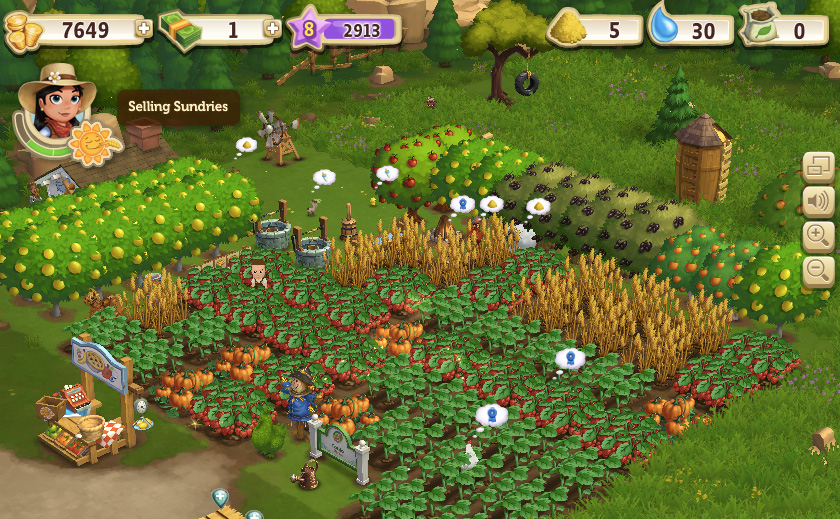
FarmVille 2

Stage3D’s potential is huge and it looks like the boys and girls at Zynga have done a great job of showing just what the Flash platform can now produce within the browser. FarmVille 2 takes the game mechanic from the original but now renders everything in glorious 3D. Even on fairly modest hardware the results are very impressive.

If you’re considering getting into 3D programming with Flash then there are many available 3D frameworks built on top of Stage3D. However deciding which one to use can be a problem. Zynga opted for Flare3D and its suite of tools. I’m sure you’ll agree that FarmVille 2 does a great job of demonstrating what can be produced with Flare3D.

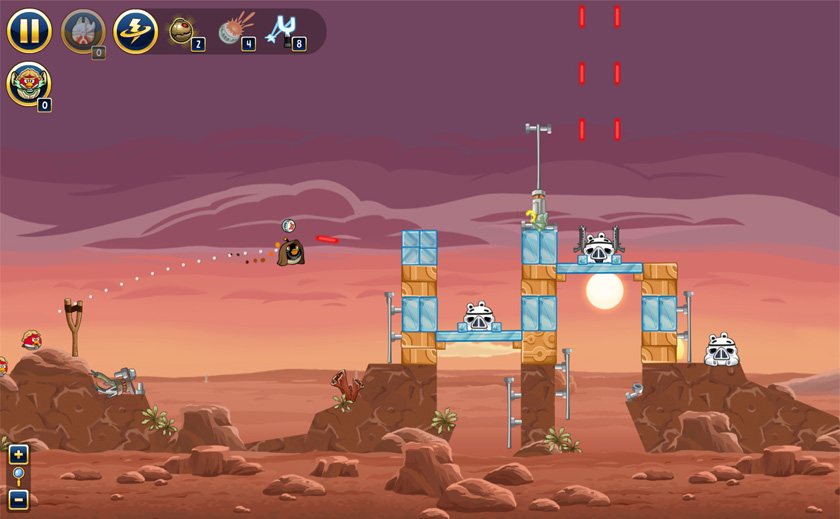
Angry Birds Star Wars

I don’t think there’s single person on this planet who doesn’t know what Angry Birds is. The iOS hit made its web debut last year thanks to Stage3D and the Starling Framework, and it’s back once again with this really amazing Star Wars edition.

Developers Rovio once again opted for the Flash Platform for their second Angry Birds Facebook offering. The excellent Starling Framework was employed as the game’s rendering engine.

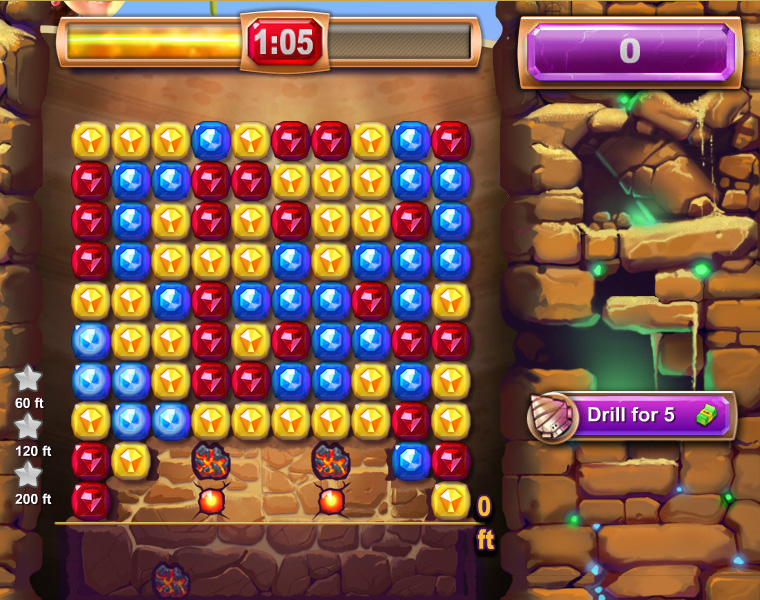
Ruby Blast

There are tons of match-three games out there and Zynga’s Ruby Blast is an excellent example of the genre. Tap sequences of coloured gems to blast your way underground. The deeper you get, the more time you earn to prolong each game and increase your score.

Powered by Stage3D and the Starling Framework, Ruby Blast is another excellent example of what Flash is capable of these days. There’s also an Adobe AIR port of Ruby Blast for iOS.

CityVille 2

I’ve already mentioned FarmVille 2, but there’s also CityVille 2, which is definitely worthy of some of your gaming time. Similar to the classic Sim City game, it’s your job to build and manage your own city.

As with FarmVille 2, Zynga decided to build CityVille 2 using Flare3D. Once again, performance is excellent and it really is hard to believe that we’re now seeing content this rich running within a web browser.

Creating a Custom Virtual Keyboard

Although AIR for iOS offers access to the iOS virtual keyboard, you have limited control over the type of keyboard that appears. If you want additional keyboard configurations within your Flash project then you’ll need to build your own custom keyboard component. Although this will require some development effort it will allow you to tailor the user experience. For certain apps such as games, you may actually find a custom keyboard is the preferred option, as it will better fit your visual design.

Let’s see how to create one using Flash.
Flash iOS Apps CookbookThis tutorial is a previously unreleased recipe from Flash iOS Apps Cookbook and supplements the content found in Chapter 7, Working with Text and the Virtual Keyboard.
Flash iOS Apps Cookbook provides the recipes required to build native iOS apps using your existing knowledge of the Flash platform. Whether you want to create something new or simply convert an existing Flash project, the relevant steps and techniques are covered, helping you achieve your goal.

Getting Ready

An FLA has been provided as a starting point.

Download this recipe’s accompanying source bundle and open chapter7/recipe8/recipe.fla into Flash Professional.

The visuals for this application have already been created. Sitting on the stage is a virtual keyboard and a dynamic text field. The text field will be used to output what the user types.

The dynamic text field has been named field while the movie clip instance that represents the virtual keyboard has been named keyboard.
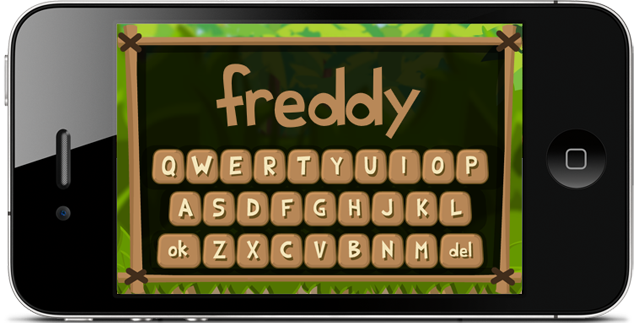
Entering a player's name with a custom virtual keyboard.

With the Selection tool (V) selected, double-click on the keyboard instance to examine its timeline. The keyboard contains 28 keys – 26 for the letters of the alphabet, an ok key for when the user is finished typing, and a del key to delete a character. You’ll find that each alphabetic key is represented by its own movie clip and that the instances are named a_key to z_key. This naming convention makes it easy to determine the letter that a key represents by simply examining the first character of its instance name. The remaining two keys have instance names of ok_key and del_key. Additionally there’s a movie clip named surface that sits beneath the keys and represents the keyboard’s body.

Double-click on any one of the keys to examine its timeline. Each is represented by two frames, where the second frame will be shown when the key is being pressed. The movie clip symbol for each key is linked to a class named Button, which was introduced in the Handling user interaction recipe from Chapter 4. Open Button.as and familiarize yourself with the code.

How to do it…

Perform the following steps.

  1. From Flash, select File | New and create a new ActionScript 3.0 class. Name it VirtualKeyboard.
  2. Add the following ActionScript to the class:
    package {
    	
      import flash.display.MovieClip;
      import flash.events.MouseEvent;
    	
      public class VirtualKeyboard extends MovieClip {
    		
        static private const keys:Array = [
          "a_key", "b_key", "c_key", "d_key", "e_key", "f_key", 
          "g_key", "h_key", "i_key", "j_key", "k_key", "l_key", 
          "m_key", "n_key", "o_key", "p_key", "q_key", "r_key",
          "s_key", "t_key", "u_key", "v_key", "w_key", "x_key",
          "y_key", "z_key", "ok_key", "del_key"
        ];
    		
        static public const KEY_ALPHABETIC:uint = 0;
        static public const KEY_DELETE    :uint = 1;
        static public const KEY_OK        :uint = 2;
    		
        private var _key:Object;
    		
        public function VirtualKeyboard() {
          mouseEnabled = false;
          surface.mouseEnabled = false;
          for(var i:uint = 0; i < keys.length; i++)
          {
            var key:Button = this[keys[i]];
            key.addEventListener(
              MouseEvent.MOUSE_UP, keyPressed);
            key.mouseChildren = false;
          }
        }
    		
        public function get key():Object {
          return _key;
        }
    		
        private function keyPressed(e:MouseEvent):void {
          var keyName:String = e.target.name;
          switch(keyName)
          {
            case "ok_key":
              _key = {type:KEY_OK};
              break;
    
            case "del_key":
              _key = {type:KEY_DELETE};
              break;
    
            default:
              var letter:String = keyName.charAt(0);
              _key = {type:KEY_ALPHABETIC, char:letter};
          }
    
          e.stopPropagation();
          dispatchEvent(e);
        }
      }
    }
    
  3. Save the class to the same location as your FLA and name it VirtualKeyboard.as.
  4. Move back to your FLA. Now you can link the class to your virtual keyboard's movie clip symbol. Within the library, right-click on the Keyboard symbol and select Properties. Click the Export for ActionScript checkbox. Enter VirtualKeyboard into the Class field. Click OK.
  5. Now we need some ActionScript that will populate the dynamic text field in response to the user interacting with the virtual keyboard. Create a document class and name it Main.
  6. For this class add the following ActionScript:
    package {
    
      import flash.display.MovieClip;
      import flash.events.MouseEvent;
    	
      public class Main extends MovieClip {
    		
        private const MAX_CHARS:uint = 10;
    		
        public function Main() {
          keyboard.addEventListener(
            MouseEvent.MOUSE_UP, keyPressed);
        }
    
        private function keyPressed(e:MouseEvent):void {
          var keyObj:Object = e.target.key;
          var keyType:uint = keyObj.type;
    
          switch(keyType)
          {
            case VirtualKeyboard.KEY_ALPHABETIC:
              if(field.text.length < MAX_CHARS)
              {
                field.appendText(e.target.key.char);
              }
              break;
    
            case VirtualKeyboard.KEY_DELETE:
              var text:String = field.text;
              field.text = text.substr(0, text.length - 1);
              break;
    
            case VirtualKeyboard.KEY_OK:
              keyboard.visible = false;
              break;
          }
        }
      }
    }
  7. Save the document class and name its file Main.as.
  8. Move back to the FLA and save it.
  9. That's us finished! Either test your FLA using ADL or deploy it to your device.

How it works...

Three simple classes were all that was needed to build your own custom virtual keyboard.

We won't go into the internals of Button.as since it was covered earlier in this book, but let's spend some time looking at both VirtualKeyboard.as and Main.as.

The VirtualKeyboard class is linked to the Keyboard symbol within your library and manages key presses. It does this by determining which movie clip was pressed before dispatching an event to any listeners.

The document class, Main.as, simply listens for this event and updates the dynamic text field to reflect the user's current input.

Let's move back to VirtualKeyboard.as within Flash Professional and take a closer look.

A constant named keys is declared within the class and holds within an array, the instance name of each key:

static private const keys :Array = [
  "a_key", "b_key", "c_key", "d_key", "e_key", "f_key", 
  "g_key", "h_key", "i_key", "j_key", "k_key", "l_key", 
  "m_key", "n_key", "o_key", "p_key", "q_key", "r_key", 		
  "s_key", "t_key", "u_key", "v_key", "w_key", "x_key",
  "y_key", "z_key", "ok_key", "del_key"
];

Within the class' constructor we make the keys interactive by simply looping through the keys array and attaching a MOUSE_UP event handler to each:

public function VirtualKeyboard() {
  mouseEnabled = false;
  surface.mouseEnabled = false;
  for(var i:int = 0; i < keys.length; i++)
  {
    var key:Button = this[keys[i]];
    key.addEventListener(
      MouseEvent.MOUSE_UP, keyPressed);
    key.mouseChildren = false;
  }
}

We receive this event when a user lifts their finger off a key, indicating a successful press. When this takes place, our keyPressed() handler is called and information regarding that key is created and stored. Here's the code for this again:

private function keyPressed(e:MouseEvent):void {
  var keyName :String = e.target.name;
  switch(keyName)
  {
    case "ok_key":
      _key = {type: KEY_OK};
      break;

    case "del_key":
      _key = {type: KEY_DELETE};
      break;

    default:
      var letter:String = keyName.charAt(0);
      _key = {type: KEY_ALPHABETIC, char: letter};
  }

  e.stopPropagation();
  dispatchEvent(e);
}

The handler checks the name of the movie clip instance that was pressed, and from the name determines which of the following key types it represents:

  1. The okay key.
  2. The delete key.
  3. An alphabetic key.

The type of key is stored within the _key member variable, and if the key represents a letter from the alphabet then its character is stored too. The class also provides a public getter method named key, which provides access to this information. We'll see the key property being accessed from the document class in a moment. Finally a MOUSE_UP event is dispatched to any listeners.

Okay, now take a look at Main.as again.

It simply listens for the keyboard movie clip dispatching a MOUSE_UP event. This event will only be dispatched if the user has successfully pressed one of the virtual keyboard's keys. You can see the event listener being added below:

public function Main() {
  keyboard.addEventListener(
    MouseEvent.MOUSE_UP, keyPressed);
}

Then within the keyPressed() event handler, we simply update the dynamic text field - field - in response to each of the user's key presses. Here's the method again as a reminder:

private function keyPressed(e:MouseEvent):void {
  var keyObj :Object = e.target.key;
  var keyType:uint = keyObj.type;	

  switch(keyType)
  {
    case VirtualKeyboard.KEY_ALPHABETIC:
      if(field.text.length < MAX_CHARS)
      {
        field.appendText(e.target.key.char);
      }
      break;

    case VirtualKeyboard.KEY_DELETE:
      var text:String = field.text;
      field.text = text.substr(0, text.length - 1);
      break;
			
    case VirtualKeyboard.KEY_OK:
      keyboard.visible = false;
      break;
  }
}

The handler calls the virtual keyboard's key property to determine which of the three types the pressed key belongs to. If it's an alphabetic key then the letter it represents is appending to the dynamic text field. If the user presses the del key then the last character is removed from the text field. Finally, if it was the ok key then the keyboard is simply hidden from view.

Building your own custom keyboard can create a more engaging experience for the user and provide consistency with your app's user interface. However if the native iOS keyboard that's available to you is sufficient then consider using it, as it's familiar and understood by all iOS users.

See also
iOS HTML5 Speedometer App

Here’s something I’ve been meaning to blog about for well over a year but for one reason or another didn’t get round to it. It’s an HTML5 port of a speedometer app I once wrote using Adobe AIR. I thought it would be a good way of polishing up on my JavaScript and also learn a few of the HTML5-specific APIs such as Geolocation. The original was badly in need of a lick of paint, so I changed the graphics a bit and also added a Need For Speed styled camera shake effect when a certain speed was reached.

To be honest, porting it from ActionScript 3 to HTML5 was fairly straightforward, and the app performed pretty well on iPhone and iPad, which I used as my test devices. Of course, the development was done on a PC so I made sure the app could swap between real geolocation data (for running on a device) and some test data (for development) I’d created. I’ve embedded a video of the app running above, complete with some test data so you can see it running.

Adobe AIR iOS Success Stories

“Really! That was done in Flash?” I’m hearing this quite frequently these days. It’s an extremely positive sign and it validates our own evaluation at WeeWorld that Adobe AIR is a more than viable tool for the creation of mobile games. If you’re still in any doubt then here’s a list of games you should download straight to your iPhone.

SongPop


Take part in music challenges between friends in this hugely popular music trivia game. At SongPop’s heart is an excellently crafted social gaming element allowing players to connect with friends via Facebook or simply find new friends who love the same music. It employs a turn-based battle mechanic, where games are won by identifying a collection of songs faster than your opponent. You can choose from over 35 playlists with samples from thousands of popular artists across multiple genres.

SongPop is available from the App Store free of charge, and has a five-star rating with over eleven thousand votes.

Wonderputt


Wonderputt is a quite beautiful isometric crazy golf game that started life on browsers and was recently ported to iPad. As soon as you launch this app you’ll understand why it was a Visual Arts Finalist at both the Develop Awards 2012 and IGF 2012. Wonderputt’s 18 holes are full of delightful little details that are unravelled as you work your way through its world of geographic delights. With Game Center leaderboards, achievements, and a triple length soundtrack, there’s plenty here to keep you occupied.

Wonderputt is available from the App Store and it’s also worth visiting the game’s development diary where you can find out all sorts of detail about its creation.

Match Mee


Easy to pick up but extremely difficult to put down, Match Mee is a simple matching game with many hidden layers. It’s incredibly addictive and if you start chasing high scores or going after its many achievements then you could easily lose hours to this one (I know people who have). Also, if you’re a developer looking for an example of an iOS game that makes great use of Flash’s vector renderer then Match Mee is definitely worth taking a look at.

Match Mee is available for free from the App Store and runs on iPhone, iPad and iPod touch.

Super Hexagon


If someone had told me a few years back that my favourite iOS game would be developed using Flash I’d have immediately suggested they visit a psychiatrists and get themselves checked out. But here I am now with Super Hexagon, a slice of gaming genius that I can’t get enough of. Marrying both retro and casual gaming elements, Super Hexagon will have you coming back for more time and again. Its hardcore nature ensures that most games last only a handful of seconds, but when beating your previous best by milliseconds feels like serious progress you’ll soon find yourself losing hours as you convince yourself that all you need is one more try.

Smart Aliens


If you’re looking for an example of what can be done with the Starling framework then look no further than Smart Aliens. Running at a super smooth 60 frames per second, it shows the performance benefits you can get from working on top of Adobe’s Stage 3D. Smart Aliens is another perfect example of social gaming. Whereas many iOS games employ turn-based mechanics, Smart Alien goes for real-time battles with friends in what can only be described as a modern take on hangman.

Smart Aliens is available for free from the App Store. Check it out.

Ruby Blast


Last but certainly not least is Zynga’s Ruby Blast, which is a direct port of their excellent Facebook game. The fact that social gaming experts Zynga are now developing cross-platform mobile apps with AIR is a shining endorsement for the Flash platform. It’s also another great example of the power of Stage 3D and the Starling Framework. It has only been available for a few weeks but Ruby Blast has already gathered nearly seven thousand positive reviews. Pop on over to the App Store and give it a try.

Match Mee for iOS Released

At WeeWorld we just released our latest iOS game, Match Mee, and I’m delighted to announce it’s our first app written using Adobe AIR. This is quite a departure for us as previously we’ve exclusively written native apps. However, given the continual improvements to the AIR SDK and the fact that Match Mee required the use of a vector rendered, it just made more sense to use our Flash expertise. Plus it puts us in a very nice position where we can relatively quickly push out an Android port when the time comes.

Match Mee’s a universal app (iPhone, iPad & iPod touch) and although Apple announced the iPhone 5 shortly before we were due to release, we managed to squeeze in support for the new resolution at the last minute. A few native extensions were also written in-house to provide support for Flurry Analytics and various ad networks. Additionally, Game Center, Facebook integration, and app rating support was provided by Milkman Games who also gave excellent support to iron out a few minor issues we were seeing on legacy hardware.

I can’t over emphasise how important Flash’s vector renderer was for us in this project. The game randomly generates WeeMee’s of varying sizes from a pool of over 200 assets. The combined size of all this vector information was just over one megabyte and, of course, scaled perfectly across the various resolutions supported across the full range of iOS devices. Keeping the file size down using a bitmap-based solution would have been very difficult.

If you have an iOS device then please take Match Mee for a spin (it’s free) and let me know what you think. At its core is a simple and fun game mechanic that’s very easy to pick up but pretty damn hard to put down.

Hopefully we’ll use Adobe AIR again for future apps as it seems to be picking up some momentum as a mobile development platform.

Oh and if you’ve got a minute to spare then jump over to our Facebook page and give MatchMee a like. Thanks!