Flash Camp Birmingham

Not long to Flash Camp Birmingham and it’s shaping up to be a good one.

Held over an afternoon and an evening, Flash experts including Seb Lee-Delisle, Mike Jones and Mark Doherty, will share their knowledge through presentations and talks. No matter what level of experience you have with Flash there will be something for you. As an added incentive there will also be the usual prize giveaway from the events many sponsors.

So put the 24th of March into your diary and pop over to the Flash Camp Birmingham website to book your free ticket.

Flash Player 10.2 is Live

Good news, Flash Player 10.2 is now live and available for download. Additionally the debug versions of the player are also available for development purposes.

So what’s new then? Probably the biggest feature is Stage Video, which delivers high performance video playback. Stage Video should alleviate much of the criticism levelled at Flash in the past concerning video performance, CPU usage and power consumption.

Another great new feature is the dual-monitor support for video playback. You can now watch a video in full-screen on one monitor and continue to work in the other. On previous version of the player, full-screen video switched off as soon as the user started working in the second screen. This was somewhat annoying so it’s great to see it finally fixed.

For more details and some Flash 10.2 tutorials pop over to ByteArray.org.

Taking Advantage of the SWF Format

The SWF file format is incredibly compact, and if you know what you’re doing you can create quite gorgeous things in only a few kilobytes. Unfortunately to take advantage of the format you sometimes need to have an understanding of how it works, or at least have someone show you some best practices for creating content.

45Kbytes SWF v 4Kbytes SWF.

Take a look at both these virtual assets. At first glance they might look identical and to be honest they’re both similar enough that it wouldn’t concern a user. But the version on the left is 45 Kbytes while the one on the right comes in at a tiny 4 Kbytes!

So what’s the difference?

Well, it’s all down to how the flower pattern has been created. The optimized version contains only 3 movie clip symbols in the library – one for the pink flower, one for the blue flower, and a single leaf. The pattern is created by simply using multiple instances of each symbol then applying some scaling and transformations to keep things interesting.

Dress on the right uses movie clip instances to reduce SWF size.

The bloated version on the other hand doesn’t use library symbols. Instead the entire flower pattern has been hand drawn. Although it gives the same result, it seriously increasing the file size since the vector information for every single flower on the pattern has to be stored within the SWF. The optimised version however only needs to store the vector information for the 3 movie clip symbols stored in the library, giving a significant reduction in the final file size.

If you’ve been doing Flash for any length of time then this should all be fairly obvious to you. But sometimes when the pressure’s on, it’s very easy to rush something out and forget about the final size of your SWF.

Beginner’s Guide to FlashDevelop

Flash Professional CS5 had some welcome additions for those using it to write and edit their source code, but for most developers the feature set it provides is still too limited.

There are a few options for those looking for an external source code editor. For a start there’s Adobe’s solution – Flash Builder – which has been going from strength to strength. If you’ve got the cash then FDT 4 seems to be the best option although I’ve personally not tried it. And if you already have Visual Studio on your machine then you could consider the Amethyst plug-in, which not only let’s you edit your ActionScript but allows you to debug your SWFs using Visual Studio’s excellent debugger.

But if you can’t convince your organisation to get licenses for any of the above then there’s always the excellent, and free, Flash Develop. It certainly doesn’t provide everything the IDEs listed above have, but it has some nice features, which Michael James Williams has kindly written about in his ActiveTuts+ tutorial. So if you’re still using the Flash IDE for code then I urge you to check out Michael’s tutorial and see what you’re missing out on.

Thibault Imbert is a Trendsetter

A few months back I forced my sister-in-law to watch a really cool video showing off the capabilities of the upcoming Molehill APIs. Even though she’s not a Flash developer, she gazed at the screen in amazement and I was happy that she seemed to get it.

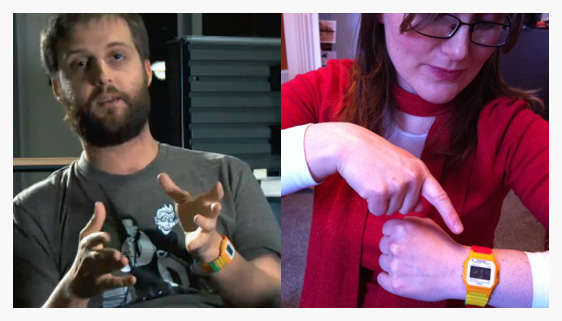
Double rainbow watch all the way across the screen.

So I was a little confused when I started talking to her about Molehill recently only for it to quickly transpire that she had no idea what the heck I was talking about. Turns out she hadn’t noticed the magic of Molehill. Instead it was Thibault Imbert’s cool watch that had caught her attention. So much so that she went out and got herself one.

So there you have it. Looks like the people in the Flash community can be an inspiration to not just other Flash developers, but those who know nothing about it too.

Learn Adobe AIR for Android

If you’re a Flash developer who’s interested in Android mobile development then check out my two-part tutorial – Build a GPS Speedometer.
The first part is available from Mobiletuts+ and covers the basics of AIR for Android development. Part two can be found on Activetuts+ and ensures that you come away from the tutorial having built and deployed onto your mobile a fully working app.

Don’t worry if you don’t have an Android device, you can still follow the steps and test on your desktop using the GPS data that’s provided with the source code. There are some tips and tricks for mobile optimization scattered throughout the second article too.

Hope you find it useful and all feedback welcome.

Tegra 2 and Flash

Looks like Flash on tablets and smartphones could be in for a serious performance boost this year thanks to Nvidia’s Tegra 2, which was announced at CES. Featuring hardware-accelerated Flash support, Nvidia are claiming a five fold increase in Flash performance on hardware that uses the chip.

Several Flash-enabled Tegra 2 powered devices were announced at the event including the LG Optimus 2X and the Motorola Xoom. I must say the Xoom in particular caught my eye. With most OEMs opting to build 7″ tablets, it really is great to see Motorola have the guts to go with a larger 10″ screen.

With Flash Player and Adobe AIR making it onto more, and increasing more powerful devices, it could be an interesting year for the platform. Oh and Android Honeycomb is looking pretty nice too.

Help Me Obi-Wan Kenobi…

This post has been long overdue.

Firstly, a huge thank you to those who keep enquiring about my X-wing Targeting Computer app. Secondly, please accept my apologies for not posting sooner.

So what have I been up to over the past few months?

Well the app is about as ready as it can be without some external help. Unfortunately the largest hurdle is getting licensing sorted out and it’s proving to be a major problem. I have been in contact with various publishers who were unfortunately unable to take the project on for one reason or another. And getting the contact details for the correct individuals at Lucas Licensing or LucasArts seems to be impossible.

So I guess the only way I can take this project further now is for you guys to re-tweet this post and see if it can make its way into the hands of someone who might be able to help. How does that sound?

I know it’s not what you wanted to hear but unfortunately I’m unable to take this forward on my own and have been advised not to release it onto the Android Market without getting licensing cleared – I don’t want George Lucas sending bounty hunters after me after all.

A huge shout out to those who have already passed me contact details for various individuals they thought might be able to help – Bobby I owe you big time for your patience and help as always. Oh and for those asking for an iPhone version – I did start work on this but I’m not going to continue unless I can get licensing sorted out.

So hopefully someone out there can help me out with this one. Until then I’m afraid I’m the only one who’s gonna know just how awesome it feels to have your very own targeting computer set-up in your car.

Thanks, and may the Force be with you. Always.

Merry Christmas

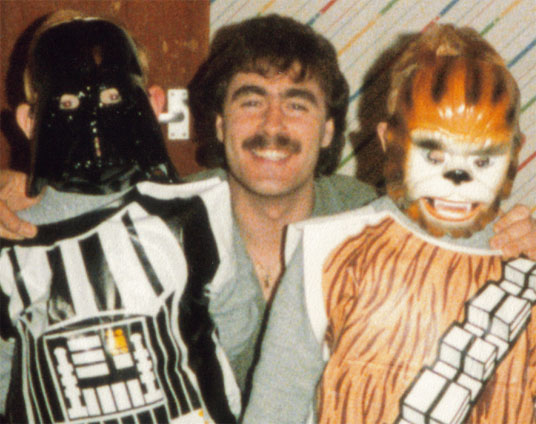
For those who don’t know me, I like Star Wars even more than I like Flash. With Christmas only a few days away I thought I’d share this photo with you guys and tell you a little cautionary Christmas tale.

That’s me and my brother dressed up in those crappy Star Wars costumes. And even though we were only seven, we could tell that ours fell quite short of the originals worn in the movies. The masks we’re wearing can’t even hide our disappointment.

Now call me ungrateful, but when my folks told me that Santa was bringing me a Darth Vader outfit I expected it to be exactly like the one from the film. Not once did they sit me down and try to lower my expectations by explaining things.

So I excitedly counted down the days only to be left mentally scarred by what turned out to be one of the most disappointing Christmases I’ve ever had. Not even a surprise visit from my Unlce Borat, who flew all the way over from Kazakhstan, could cheer me up.

So if you have kids, make sure you’re straight with them about what they’re getting. You don’t want them turning to the dark side do you.

Now don’t get me started on the fake Lightsaber I got the year before. Oh and have a great Christmas and New Year!

GPU Rendering on iPhone and Android

I’ve been meaning to write this post for a few months now but never seemed to find the time. It’s related to my Packager for iPhone: Render Performance article and regards rendering differences between content written for AIR for Android and the Packager for iPhone.

In short, the article highlighted the performance problems when playing timeline animations on iPhone and instead suggested the use of ActionScript to create bitmap animations by flicking between a collection of BitmapData objects, where each BitmapData object represented a frame of the animation.

With GPU acceleration enabled, using ActionScript to run these bitmap animations was easily improving performance by a factor of at least 6 compared to the traditional timeline approach.

Even constructing timeline animations that held bitmaps on each frame (rather than vectors) failed to match the performance that could be achieved from using the ActionScript outlined in my examples.

This is shown in the video below, where 23 animating objects are randomly placed on the screen. Each animation is 4 frames long, with each frame being represented by a 274 x 366 bitmap. The first app launched in the video uses the traditional movie clip approach, with the animation being constructed on the timelime. The second app uses ActionScript to produce the same effect. Both apps use GPU rendering mode. The difference in frame rate between the two apps is quite noticeable.

So does the same hold true for AIR for Android?

Well to be honest I had initially assumed it would and hadn’t actually bothered checking. But when I eventually did get round to it I was pleasantly surprised. It turned out that when using GPU acceleration, bitmap animations on the timeline run just as fast as their ActionScript counterparts. When running both tests using CPU render mode, the ActionScript code was faster but only by about 50%.

The video below shows the same demo’s from the iPhone example, but running on Android. This time the traditional movie clip approach performs just as well as the ActionScript-based animation.

This news is good and bad.

It’s good because for AIR for Android projects I can start using movie clips and the timeline for creating animations again, which is a huge time saver and gives me all the benefits I expect from using Flash. On the other hand, it’s bad because the rendering differences between my iPhone and Android apps mean that if I want to target both platforms I’ll need to continue to use an ActionScript-based solution, which adds to the development time.

So why do apps written using the Packager for iPhone seem to struggle so much? Perhaps this Adobe MAX session by Adobe AIR engineer David Knight and platform evangelist Renaun Erickson sheds some light. It seems that Adobe’s implementation of GPU rendering mode for iOS works slightly differently to their Android implementation.

Rendering typically comprises of two parts: rasterizing and scene composition. When GPU rendering is used on iOS devices, the rasterizing always takes place on the CPU, with only the composition taking place on the CPU. For Android, both rasterizing and composition take place on the GPU. In other words, for movie clip animations, each frame the playhead moves to, must first be rendered into a pixel buffer in RAM before being copied to the GPU. This is expensive and I’m guessing is the reason Flash performance is impaired on iPhone.

So is this something that Adobe is likely to change in the future or is it a limitation of the iPhone’s hardware? Personally I don’t know the answers to that but it would be great to know.

Right now, this subtle rendering difference seems to be the reason why Flash developers are experience so much pain developing apps for iPhone.

For anyone who’s interested I ran the two tests across several devices and using both CPU and GPU rendering modes. The results are shown below and include the frame rate that the test managed and the number of pixels that were rendered per second.

It was hardly the most formal of tests but each app attempts to display 23 animating objects and measures the number of frames that were successfully rendered over a 5 second period. From that the frame rate is calculated. Each display object is 274 x 366 pixels in size, meaning that 2,306,532 pixels need to be rendered per frame in order to draw all 23 display objects.

Results

Device Animation Type Render Mode Frames Per Second Pixels Per Second
1st gen iPod touch ActionScript GPU 12 27,678,384
ActionScript CPU 5 11,532,660
Timeline GPU 2 4,613,064
Timeline CPU 2 4,613,064
2nd gen iPod touch ActionScript GPU 15 34,597,980
ActionScript CPU 7 16,145,724
Timeline GPU 2 4,613,064
Timeline CPU 2 4,613,064
iPhone 4 ActionScript GPU 56 129,165,792
ActionScript CPU 17 39,211,044
Timeline GPU 5 11,532,660
Timeline CPU 5 11,532,660
Google Nexus One ActionScript GPU 23 53,050,236
ActionScript CPU 12 27,678,384
Timeline GPU 23 53,050,236
Timeline CPU 8 18,452,256
Samsung Galaxy S ActionScript GPU 29 66,889,428
ActionScript CPU 12 27,678,384
Timeline GPU 29 66,889,428
Timeline CPU 7 16,145,724

If any of my calculations look disastrously wrong then let me know.

You can find the source files for the tests here.

Feel free to test on other devices and send me your results.

Oh, and for faster devices you may want to increase the FPS setting within the FLAs. At the moment the Android FLAs are capped at 30fps while the iPhone FLAs are capped at 15fps. I had to increase the frame rate setting when testing on iPhone 4 to 50fps after noticing the original test results were reporting 14/15fps.