Starling 1.4 Released

I’m a huge fan of the Starling framework, so it’s great to see that Gamua has just released Starling 1.4. And hot on its heels is version 1.1.1 of the Feathers UI framework, which sits on top of Starling and allows developers to create lightweight, skinnable and extensible UI controls for their mobile and desktop projects.

Here’s a list of the new features that Starling now provides:

  • 10% performance increase
  • Sprite masking with the new clipRect property
  • Displacement map filters
  • Enhancements to the Asset Manager
  • Support for 4K textures
  • MacBook Retina Support

For a more comprehensive list of features head over to the Gamua blog.

Personally it’s always good to see Gamua’s Daniel Sperl constantly squeeze more performance out of the framework. Daniel spent considerable time tracking down memory allocation issues with Adobe Scout to alleviate garbage collection overheads. Various other optimizations were also performed to increase display object performance.

I’m also delighted to see that it’s now possible to easily add rectangular masks to sprites with the new clipRect property. One of the strengths of clipping rectangles is that they are relatively inexpensive ways of performing masking.

Perhaps the most exciting feature is the addition of the DisplacementMapFilter class. All sorts of visual effects should now be possible including water reflections, swirling vortexes, image pixelation etc. In fact, here’s a nice demo illustrating just what’s possible.

So yeah, another solid release of both Starling and Feathers.

Away3D TypeScript

It looks like there has been some significant work going on to port Away3D to Typescript. For the last few months plugin.IO and Karim Beyrouti have been busy porting Away3D to JavaScript via TypeScript. The process has required reverse-engineering of the Flash framework and Adobe themselves have been on hand to help.

The nice thing about TypeScript is that it will make working with this port of Away3D feel fairly familiar for those coming from an ActionScript 3 background. And of course, targeting JavaScript means that you’ll be able to work outside the Flash Player, instead targeting HTML5 and WebGL. This fact alone will obviously help developers push content to compatible mobile browsers.

There’s still work to be done but you can get the current version of the code here on GitHub. Also, take a look at the following demos, which give a very good indication of the state of the project:

https://dl.dropboxusercontent.com/u/94775998/WebGL/Demo14/index.html
https://dl.dropboxusercontent.com/u/94775998/WebGL/Demo18/index.html
https://dl.dropboxusercontent.com/u/94775998/WebGL/Demo13/index.html

With the Starling framework also being ported to TypeScript it’s good to see another popular framework going in the same direction.

Mobile Workers Coming to Mobile

It has taken a while but it looks like mobile workers are finally going to see the light of day on Android and iOS. They were announced as part of the Adobe AIR 3.9 beta, which is now available for download. In fact, here are the features that you can try out right now:

  • Mobile Workers for Android
  • Mobile Support for Background Execution
  • iOS7 Support
  • Mac OS 10.9 Support
  • Android XXHDPI Icon Support
  • ActionScript Compiler 2.0 Integration

You’ll notice that mobile workers are only available in Android at the moment but a later download of 2.9 will also provide iOS support. Being able to run code in the background without interrupting your application’s main code is a huge feature.

Another interesting feature is that any apps built using Direct Render Mode will now support code execution even when the app is in the background. For example, you could write an app that continues to perform audio playback even after the user has exited the app and left it running in the background.

With the release of iOS7 imminent it’s good to see that AIR 3.9 will provide support for it. Oh and support for high resolution Android app icons is a welcome feature.

So yeah, pop along to Adobe Labs and give AIR 3.9 a spin.

Oculus Rift

We had an Oculus Rift in the office the other day and I think it has the potential to be a real game changer. In fact, after only a few seconds inside virtual reality I was sold by the Rift’s amazing immersive experience. First up was the Sixense Tuscany demo, which was a great introduction to help me steady my VR legs. My first thought was ‘Star Trek Holodeck’. Even though I needed a joypad to walk I still felt as if I was actually part of the game world. Being able to quickly look over my shoulder just felt so natural and right. And there was a very real sense of elevation when standing on balconies and platforms. It’s these simple things that bring everything to life.

Next I explored the oceans; swam with a school of fish then brushed past an enormous whale. Everything just looked so solid and, well, there. On several occasions I caught myself trying to reach out and touch things. My deep sea adventure came to an abrupt end when I was eaten by a shark. I was actually looking the other way when it got me, but I have been informed that staring straight into the shark’s deep black eyes is quite a terrifying experience. In fact, my buddy Ian ripped the headset off on his first encounter with it.

The last demo was actually my favourite. RiftCoaster takes you on a roller coaster ride through the medieval Epic Citadel map. Climbing up to the top of the first dip was astonishing as I took in the view of the city’s impressive towers and spires. Before I knew it I was shooting down the other side and gripping onto my chair for dear life. Even without the g-forces, there’s something about the whole immersive experience that tricks the brain into believing you’re actually rattling along a roller coaster track. It’s even better when you’ve got someone to shake your chair for you!
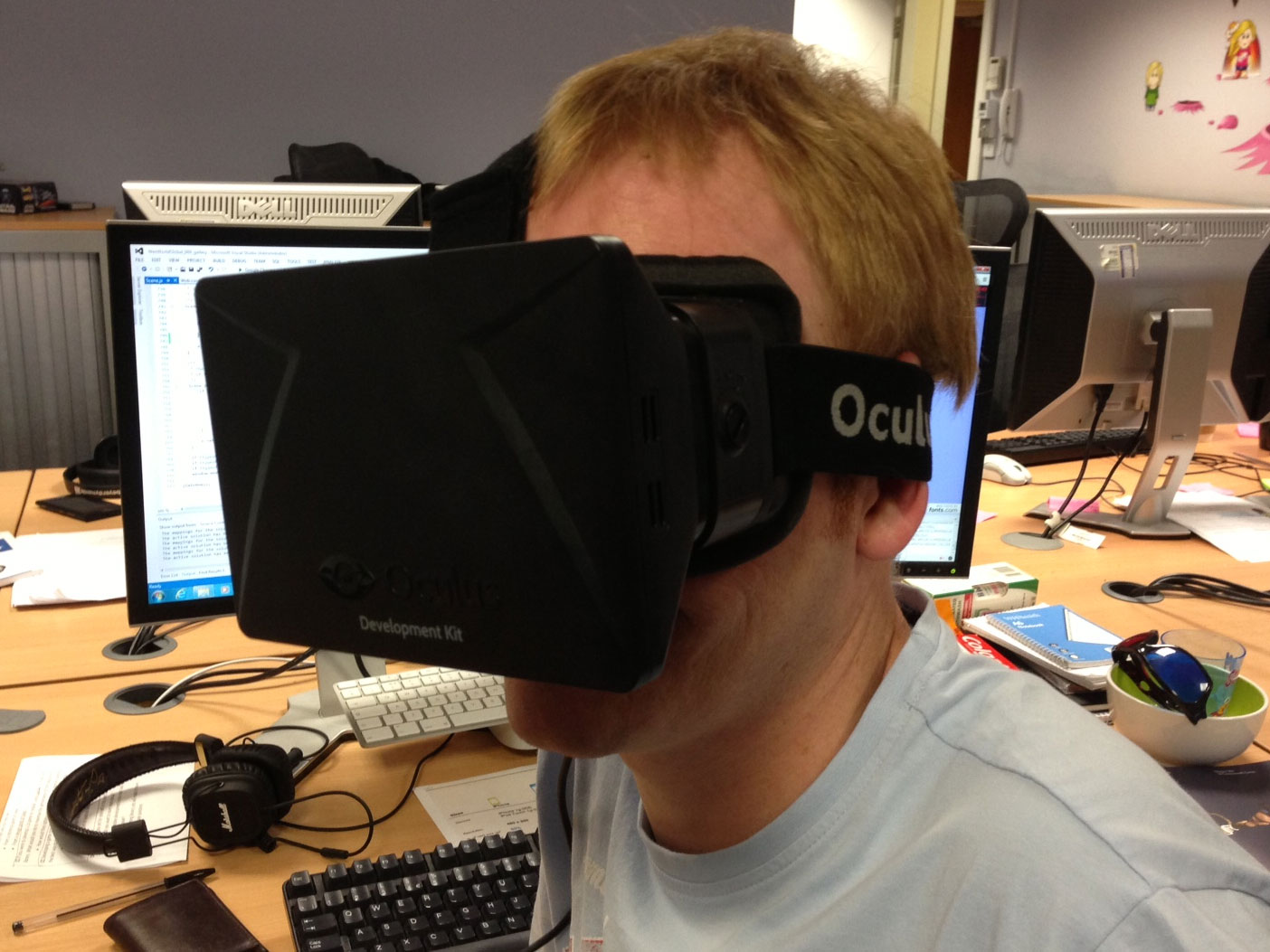
The headset is surprisingly light and comfortable.

Oculus Rift certainly isn’t the finished article yet but unlike PS4 and Xbox One, it has got me super excited. The headset’s screen resolution definitely needs increased. While it certainly isn’t terrible it does break the illusion a little. It’s also quite tricky to configure the Oculus Rift with you having to muck around selecting the correct lenses to use. Also, pushing your head forward doesn’t have any effect. It might not seem like a big deal but it is when you try and lean out of a window only for nothing to happen.

It’s also slightly disconcerting when you can’t see your own hands in front of your face. Of course, with Xbox One and Kinect that could all be rectified. It would be quite incredible to be able to look down and see your whole body. With Kinect that’s entirely possible and I’ve already seen some early demos that have successfully gone down this route. In fact, if Microsoft were to have the sense to embrace the Oculus Rift then it could give people a real reason to buy the Xbox One.

I really can’t wait to see how this pans out over the next year or so. Hopefully we’ll see some big name games studios produce great games that take advantage of the Oculus Rift. Personally I’m holding out for a remake of Stunt Car Racer.

A huge thanks to Ian for bringing his Oculus Rift into the office for everyone to try out.
Bunny Boss Battle

It’s been a few months since I last showed off Bunny Vengeance. Well here’s the latest version of the prototype and as you can see from the video it’s looking much more complete. The most obvious change is the addition of the Boss – previously you were just fighting a clone of yourself. Blocking punches is now much more convincing too and your character will actually get pushed back as he tries to deflect blows. I’ve also gone ahead and hooked up some special moves, which can only be activated by first building up a charge bar.

As far as beat ’em ups go the game’s deliberately simple. It’s a two-button affair (attack and defend), which I feel helps keep things in the spirit of touch screen gaming. It’s still a long way off being a finished game and the UI needs some serious work but I think we’ll move on and explore some other gameplay ideas and concepts first. My buddy Alex has a few ideas up his sleeve and hopefully he’ll be able to get some new artwork over to me soon. I’ll keep you guys posted.

Going Mobile with Flash and Scaleform

Thanks to Autodesk’s Scaleform, the user interfaces in many of your favourite video games have all been created using Flash Professional and successfully integrated with the game’s native code. Mass Effect, Crysis and Halo Wars are prefect example of AAA titles that have gone down this route. However Rovio – the makers of angry birds – have recently shown that you can do much more than just build game UIs with Scaleform. Their latest mobile game, Tiny Thief, uses the Scaleform Mobile SDK to port Flash CS5 animations and ActionScript 3 code to both iOS and Android, and the end result really is quite impressive.

The Scaleform Mobile SDK provides a standalone Flash runtime for native iOS and Android developers, allowing for the easy deployment of Flash content on mobile. Tiny Thief’s development team, 5 Ants, took advantage of Scaleform to render the vast amounts of Flash artwork they produced for the game. Around ninety percent of the artwork was vector graphics and with Scaleform’s optimised GPU accelerated renderer, there was no need to convert the artwork to bitmaps first. Scaleform also supports ActionScript 2 & 3, with the ability to also integrate with native code. This made it extremely easy for the team to develop across platforms. The majority of the game’s codebase used ActionScript 3 with only small amounts of platform specific code for each platform.

Of course, you’d be right in saying that you could just do all this with Adobe AIR and use native extensions to plug the platform specific gaps. And it’s certainly a perfectly valid and cost effective solution. Autodesk however highlight several benefits their solution has over AIR. This includes much faster compilation times, lower app footprints, and a high quality anti-aliased renderer. Whatever route you decide to peruse I think it’s interesting to see the many ways in which the Flash platform can be used to produce great games and content.

Download Tiny Thief (iOS & Android) and see just what’s possible with the Scaleform Mobile SDK. Also download Starforce Battlement for iOS, which again uses predominantly Flash and ActionScript 3. If you want to know more take a look at the the Scaleform Mobile SDK page and check out the documentation and video tutorials.

Stick Tennis

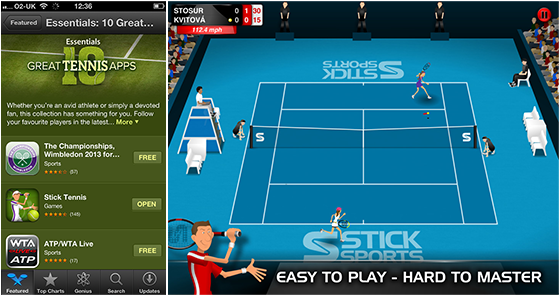
I actually meant to post about this game when it was originally released last year but for one reason or another didn’t get round to it. Thankfully its feature the other day on the App Store reminded me about it again. Stick Tennis is a really cool Adobe AIR tennis game that will have you thumping crosscourt winners with simple one-fingered swipes.

It’s available on iOS, Android, Blackberry, and desktop browsers and is another great example of what you can build with Flash & AIR. What’s also really cool is that Stick Tennis’ developer Richard Lord also made the native extensions he wrote available on GitHub. Fingers crossed for a Murray victory (I hope MacDog isn’t reading this) at Wimbledon today.

TypeScript

I’ve been doing a lot more JavaScript recently and while I’m enjoying it I do really miss the type safety and object-oriented language features provided by ActionScript 3. This is especially true for larger projects where a proper object-oriented approach would be ideal. JavaScript’s typeless and dynamic nature means it’s incredibly easy to introduce bugs that just lurk around waiting to cause some runtime mischief whenever it takes their fancy. While it’s very easy to quickly throw things together in JavaScript, you can lose all that time bug fixing. In fact, the larger a JavaScript project gets the more terribly afraid I become of refactoring or adding features to the existing code base.

In TypeScript I think Microsoft has a really great solution to this problem. It’s a superset of JavaScript that offers static typing, classes and interfaces. All these features are available at development time and are compiled down to JavaScript for deployment. The other really neat thing about TypeScript is that it also supports ECMAScript 6, meaning that if you want to forego static typing and a few other features then you can actually start working with what’s likely to become the next official version of JavaScript.

As someone who obviously comes from a Flash background I’m finding this all quite mouthwatering. Just like Zynga’s PlayScript, TypeScript is in many ways a spiritual successor to ActionScript 3. Developing with TypeScript and working with Flash content exported using the Toolkit for CreateJS could provide a really familiar workflow for Flash developers. Plus, whereas AS3.0 is likely to be the end of the line for the ActionScript language, it looks highly likely that TypeScript will have a future.

Check out the video above where Microsoft’s Anders Hejlsberg gives an introduction to TypeScript.

Getting to grips with Git

It seems every man and his dog is using Git for version control these days and I’d been feeling a tad left out of late. You see I’ve been using Subversion for close to seven years now both for personal projects and at WeeWorld (we used SourceSafe in the very early days but that’s best forgotten). And previous to all that I used CVS in various other jobs. For some reason however, Git always seemed like a mysterious dark force that was best left alone.

Well I finally decided to actually spend a few days getting to grips with Git and I must say it’s actually pretty straightforward. Git’s branching model is really nice and I love the fact that I can very quickly create and work with new branches, and just as easily switch between branches. Being distributed, most operations are performed locally, making it much faster to work with than the likes of SVN, which always requires communication with a server. In fact, there were quite a few times recently when I had no internet connection but was still able to happily work away.

I’m certainly no Git expert but hopefully I’ve got my head around the basics and I’ll continue to use it for personal projects. I got myself setup with a Bitbucket account which lets me create unlimited private repositories with up to 5 users. I’ve actually mostly been using the command line at the moment but I also have the SourceTree client. Oh and I bought and flicked through the pages of Git – Version Control for Everyone, which I thought was a very good introduction.

Zynga: “With PlayScript we got AS4 for free”

Here’s an interesting presentation from Zynga’s Ben Cooley talking about their cross-platform endeavours with Flash and Adobe AIR. He spends some times exploring the benefits of AIR and the challenges of porting Flash-based browser games to mobile. A significant portion of his presentation is also given over to Zynga’s PlayScript language and compiler, which I’ve mentioned before in my blog.

PlayScript was developed to circumvent many of the problems Zynga had with AIR, such as the limited access to native device APIs, ActionScript’s poor performance compared to native code, app size overheads, and lack of native UI support. What’s also interesting is that the PlayScript language is essentially a mash-up of C# and ActionScript 3. Ben basically says in his presentation that with PlayScript, Zynga effectively has a language that is very similar to what ActionScript 4 could have been.

Later on there’s also some talk of an experimental JavaScript compiler, which could allow PlayScript or ActionScript 3 projects to target web browsers that don’t support Flash Player. There are also some live demos shown near the end of both Starling and Away3D being successfully used in PlayScript projects and running outside of Adobe AIR.

It’s all really impressive stuff and makes you wonder why Adobe never really took Flash, AIR and ActionScript in this direction. It’ll be really interesting to see the progress Zynga make with PlayScript and also what quality of games they produce with it.