Flash content doesn’t have to be bloated

I keep hearing from friends and colleagues that Flash is notoriously slow and the content it produces is hopelessly bloated. Of course this simply isn’t true but recently I’ve been finding out the hard way that it’s not easy to convince many of them otherwise.

Now I’m not attempting to turn this into a Flash v HTML5 debate but I do believe that some of these misconceptions have been borne out from the war that has erupted between those who support Flash and those who want it gone. However I feel most of the blame lies with those who use Flash and I do confess to being as guilty as the next man when it comes to writing large SWFs that use poor loading strategies.

It is all too easy to create unnecessarily large SWFs by producing hopelessly large vector images, packing your SWF with high-quality bitmaps, and forcing all your code and resources to load up-front. Ignore everything that’s great about Flash and you’ll soon have users yawning as they wait for the entire SWF to download before they’re able to try out your latest masterpiece.

So in an attempt to re-educate many of the non-Flash developers at WeeWorld I set myself the task of ensuring that any Flash content produced for our latest project would be as small as possible without a loss of perceived quality.

But first we had to decide if Flash was required at all. From the initial mock-ups it was clear that HTML, JavaScript and some server-side cleverness would take care of the majority. There was however one section right in the centre of the page that was screaming out to be done in Flash (or at least that’s what I believed).

Fame Game mock-up

Hey! I want to be Flash!!!

The centre panel in the mock-up above represents a little voting game where users get to vote for their favourite WeeMees during a fashion contest. Each time the user votes a new WeeMee is loaded from the server and slides into view. After voting, a panel is updated showing the current voting statistics for that WeeMee. To ensure the voting experience was as fluid as possible we decided to cache WeeMee SWFs up-front to reduce loading time between votes.

First I had to justify it. After all, some team members quite rightly stated that it could probably be done in JavaScript. In the end though we went with Flash for the following reasons.

  • We’d need to load WeeMees, which are all dynamically generated on our server as SWFs.
  • Flash would give us good cross-browser support without the need for any browser-specific code.
  • The visuals could easily be reproduced using Flash’s vector drawing tools.
  • The vector content would be a fraction of the size of bitmaps.
  • ActionScript is compiled into a compact byte-code without sacrificing the legibility of the source.
  • I moaned at my boss MacDog for two weeks straight until he relented.

So how did I get on? Well in the end I split the project into two SWFs – a preloader SWF and the main SWF. The preloader came in at 4K with the other being around 12K. The combined total was a minuscule 16K! To be honest given the tiny file size it was perhaps overkill having a preloader but heh, I’d rather the user had to wait for 4K to download before seeing something rather than 12K.

The point of the preloader wasn’t to actually feedback to the user how much of the content had loaded – after all everything loaded too quickly for there to be such a need. Instead it was created to force a visual onto the screen as quickly as possible therefore giving the user the perception that the content had loaded. I was eager to, as quickly as possible, plug the hole in the HTML page where the Flash content would be rendered, and the preloader gave me that opportunity.
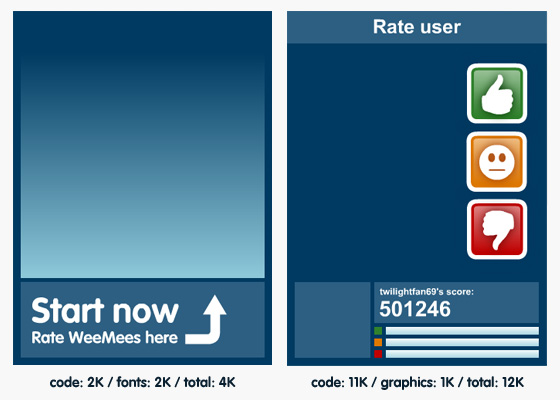
Size breakdown across both SWFs.

High level breakdown of SWFs.

The diagram above shows roughly how each SWF looks and more importantly a high-level breakdown of sizes. The preloader’s (left hand-side) content is more-or-less split 50-50 by code and embedded fonts. The final size of the graphics within the preloader was perhaps the most pleasing, with the vector content only consuming 185 bytes!

It was a similar story with the main SWF (right hand-side). The ActionScript consumed the majority of the file size while the graphics consumed next to nothing. This time the vector artwork was a little larger but still comfortably under a kilobyte, coming in at 479 bytes. Unlike the preloader I was able to use device fonts for the main SWF, further helping to reduce the final SWF size.

I could quite easily reduce the total SWF size further by spending time shortening function and variable names. There are of course many other ways to squeeze the code down but I was eager to keep it as legible and maintainable as possible. The total size of the ActionScript source across both SWFs was 41K but was reduced to 13K after compilation.

I’m happy with the result along with everyone else at WeeWorld. Many were pleasantly surprised at the final SWF sizes and hopefully it has gone a long way towards making individuals realise that there’s absolutely nothing wrong with the Flash Player or the SWF format.

If you want to keep file sizes down I’d suggest you spend as much time and effort optimising your vector content – it’s certainly where the majority of savings were made on this project. Where possible re-use content by storing your artwork in movie clips and using instances of those clips. In fact take a look at the diagram below for a more in-depth breakdown of the vector graphics used within the SWFs.
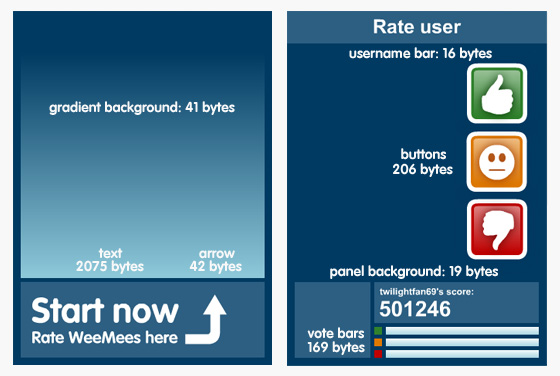
Breakdown of sizes.

Size breakdown across SWFs.

Also spend time thinking about your font usage. Only embed fonts if you really must. Where possible use device fonts, which will help reduce significantly the final size of your SWF. And although it wasn’t an issue with this project, if you find your byte-code size getting out of hand then you many want to split your code into separate libraries and load them at run-time when needed.

If you’re still in any doubt as to the compactness of the SWF format then perhaps this might give you some context. I examined the size of a single JPEG (260 x 274 pixels) loaded onto the front page of the WeeWorld site. It was a fairly compact 31K in size. Now compare that to the 16K total of our two SWF files (360 x 459 pixels). That’s right, our fully interactive Flash content with graphics, fonts and animation was half the size of a JPEG!

Anyone still want to argue that Flash can’t produce compact content?

Build an app in a week recordings

Last week saw a series of free live webinars presented by Adobe technology experts showing users how to create RIAs using the Flash platform. If you missed out or simply want to cover the material again then fear not as you can find links to each session below.

If you found the links above useful then you might want to head over to Adobe Developer Connection where you can find recordings from many other events including Flash Camps to the recently held Adobe Developer Week.

Adobe AIR 2.0 Released

Not content with giving us lucky people Flash Player 10.1, Adobe has also very generously announced the release of AIR 2.0 for Windows, Mac and Linux.

Billed as the most significant update of AIR since its original release, it consists of dozens of new features and hundreds of new APIs for developers to take advantage of. The AIR runtime itself has also been overhauled, which means your AIR apps (including existing ones) will use less CPU and consume 30% less memory.

Over the past two years AIR has evolved into one of the best platforms for giving developers the easiest and most powerful way to develop desktop applications across multiple platforms. Some of AIR 2.0’s new features include:

  • Enhanced support for interacting with printers.
  • Support for TLS/SSL socket communication.
  • Support for the detection of mass storage devices.
  • Advanced networking capabilities like secure sockets, UDP support, and the ability to listen on sockets.
  • Support for native code integration.
  • The ability to open a file with its default application.
  • Multi-touch and gesture support.
  • New APIs for access to raw microphone data.
  • WebKit update with HTML5/CSS3 support.
  • Global error handling.
  • Improved cross-platform printing.
  • Improved security and support for enterprise and government standards.

Those wondering about Adobe’s commitment to mobile will be pleased to know that AIR 2.0 for Android will also be released soon and should over the coming years help phase out Flash Lite, which has traditionally been used for Flash application development on mobile.

Download AIR 2.0 here and if you’re interested you can find a more comprehensive list of new features at the Adobe AIR Team Blog.

Flash Player 10.1 Released

Flash Player 10.1 for Windows, Mac and Linux is finally available. It’s so packed full of new features and has had such a significant architectural change that’s it’s hard to believe Adobe hasn’t just labelled it Flash Player 11. And with Flash Player 10.1 for Android scheduled for release later this month it really is quite an exciting time for the Flash community.

So what’s new? Well performance and power management are two huge features that have forced the team to re-architect much of the code base. With the intention to create a single runtime that works across both desktop and mobile, much of the engineering focus was on improving execution speed and reducing resource consumption. The player’s garbage collector has also been tuned to run more efficiently.

With Flash video under the spotlight of late, huge investment has also gone into extending video features and improving performance. Flash Player 10.1 introduces hardware-based H.264 video decoding to deliver smooth, high quality video with minimal overhead across supported operating systems (including Mac). Video delivery options have also been expanded with the addition of HTTP Dynamic Streaming for high-quality full adaptive bit-rate streaming, allowing publishers to leverage the standard HTTP networking infrastructure.

Another huge feature is the inclusion of multi-touch. With Flash Player 10.1 coming to touch-screen mobiles and tablet devices, Adobe has provided ActionScript 3 APIs supporting multi-touch and native gesture events.

Although I have mentioned hardware accelerated video playback for Mac and talked about some of the gains coming to Flash Player 10.1 for Mac in a previous post, it is worth mentioning the extra effort that has gone into the Mac player for this release. First and foremost, Flash Player 10.1 is a fully-fledged Cocoa app, with Carbon legacy support being maintained for browsers that require it. Double-buffered OpenGL support was implemented for improved full screen playback along with rendering performance improvements by using Apple’s Core Animation drawing model. Flash Player 10.1 on Mac will be more CPU efficient and will result in greater battery life on laptops.

So what are you waiting for? Install it now. For a full list of new features pop over to Adobe’s site.

Flash Camp Manchester

I’ve been told that all the cool kids will be heading to Manchester on the 8th of July for Flash Camp. Kindly organised by Flash Midlands the event will take place at Manchester Metropolitan University Business School for an afternoon and an evening of presentations, discussions and demonstrations of all things Flash.

It sounds like there will be some really exciting content on show including Flash Player 10.1 on Android, Papervision 3D, Flash Builder 4 and Flash Professional 5. So if you want to up your street cred make sure you register online and get yourself to Manchester.

Oh and did I tell you the best bit? It’s completely FREE!

Innovation through Flash

With all the recent hype surrounding HTML5 it’s easy to forget how innovative the Flash platform continues to be. Flash video in particular has taken a bashing of late from the Apple camp and with Adobe so eager to defend video in Flash many seem to have forgotten that Flash can do so much more. If you don’t believe me then take a look at the excellent video below that highlights just a fraction of the great content made possible thanks to the Flash platform.

If that has whetted your appetite then pop over to Michaël Chaize’s blog where you can find links to many of the applications shown above. Some of my favourites include an excellent demonstration of face recognition, an AS3 voice recognition library and a fantastic World Construction Kit that utilises the C++ Box2D physics library, running via Adobe Alchemy.

Flash has been driving innovation on the web for years and will continue to do so.

Windows 7 Slate with Flash Support

I gotta take my hat off to Apple. In the three years since the iPhone’s launch the other mobile OEMs are still desperately trying to play catch-up. Even the impressive Android OS doesn’t quite managed it. Android handsets are already suffering the terrible fragmentation issues (different OS versions, screen resolutions, user interfaces) that Apple has managed so well across its handsets. Sure with so many manufacturers adopting Android it was always going to be impossible to prevent this but it still gives iPhone the edge in my opinion.

Now with the release of the iPad there’s a new super shiny device on the market for all of Apple’s competitors to try and better. Let’s hope they can catch-up a little quicker than they managed on mobile. The iPad has only been on release for a month or so and Apple has already sold like a zillion units, which might not read well for Adobe who will no doubt be hoping that tablet devices from other manufacturers will support Flash and make it a viable option for parties wishing to create apps and web content for these devices.

To date there haven’t been many alternatives to the iPad that have impressed. One device however that’s looking promising is the ExoPC Slate. From the video and preview from engadget this 11.6 inch slate sounds like it could be a worthy competitor and unlike the iPad will support Flash Player 10.1. Given the recent bad press with the HP Slate, it’s a little surprising to see that the ExoPC uses Windows 7 and has its own UI layer built on top. Perhaps Windows 7 will prove itself to be a capable OS for tablets after all.

The ExoPC looks fairly complete but don’t expect it to hit the streets until September. And although there wasn’t a lot of Flash content shown in the preview video, its fairly high specs should mean that playback of Flash content will be a breeze, especially with the great optimisation work that has gone into Flash Player 10.1 by Adobe’s engineers. The second half of this year should be really interesting as we start to see more and more great Flash enabled mobiles and tablet devices appear. The big question is “By end of this year what will the number of all these Flash enabled tablets be compared to the iPad?”. Currently it stands at 2 million to zero in the iPad’s favour.

Adobe’s WIRED Magazine makes it to iPad

Remember that incredibly impressive interactive WIRED Magazine demo Adobe showed off a few months back? The one that was built using AIR and was intended ultimately for iPad until Apple banned all Flash-related content from their mobile devices? Well against all the odds Adobe announced the release of the WIRED Reader for iPad the other day and it looks every bit as slick as the original AIR demo.

The technology behind it is obviously no longer based on AIR but Adobe’s press release states it was created using InDesign CS5 and additional Adobe publishing technologies. Like everyone else I’m interested to know what the additional publishing technologies are and when the public will get their hands on it.

There was some talk of Apple and the lack of Flash support on iPad/iPhone during last week’s Adobe CS5 Road Show, with the presenter hinting that we might want to keep an eye on Adobe Labs over the next couple of weeks for a special announcement. My guess is he was referring to the WIRED app and the availability of the additional tools used to create it.

Adobe CS5 Road Show

Edinburgh is such a beautiful city and was an ideal location for the first stop of Adobe’s CS5 Road Show. It gave me the opportunity to appreciate some great architecture as well as feasting my eyes on the new features that have made it into CS5’s range of products. Being primarily a developer I tend not to focus that much on the more design orientated tools so Tuesday was a great opportunity just to catch-up on some of the CS5 products.

Of course, it doesn’t matter how many times you see it in action, Photoshop’s new content-aware fill feature is simply amazing and Adobe’s representatives were eager to show it off as often as they could during the day. Dreamweaver was another that had a lot of interest at the event and with its support for HTML5 I thought it would be a good one to check out. It didn’t disappoint and is something I might try and tinker with if I can find the time.

Adobe CS5 Edinburgh Road Show

The highlight of the day however was Mark Doherty’s session where he demonstrated Flash Player 10.1 running on the Google Nexus One. It was great to finally see 10.1 running on a mobile device and I did manage to actually get some hands on time with the hanset at the end of the session.

The performance was reasonable but Mark informed me that the current beta build actually had hardware optimisation disabled due to a last minute bug just before the announcement at Google IO. It’ll be interesting to see just what can be achieved once the issue is ironed out and hardware acceleration is switched back on. This might also explain the really bad performance we’ve been seeing in some videos on the web.

One thing that niggled me, and I’ve constantly noticed this in videos of 10.1 on the web, is the difficulty Mark had trying to focus on and sending the Flash content into full screen mode. Again I quizzed him on this and he put it down to the Flash Player 10.1 engineers changing how this feature works between builds. Fingers crossed that this usability issue gets resolved as it doesn’t seem that intuitive at the moment and actually gives the impression that 10.1 is broken.


Oh and although I enjoyed myself I do have two serious complaints to make. Firstly there were no free t-shirts to be had anywhere. The Dot Net developers at work always get free t-shirts when they go to events and used my t-shirt misfortune to deride me and mock Flash in general. Secondly the cool badges that were being given out during registration – why weren’t there any Flash badges? Don’t get me wrong, the Fireworks badge I ended up with was pretty good but wearing it didn’t let others know at a glance what a complete Flash fan boy I am 🙂

If anyone at Adobe is reading this, please send me a medium t-shirt with a huge Flash logo on it and a few Flash badges that I can pin on the foreheads of my Dot Net loving colleagues. Thanks!

Flash: A Victim of its own Success?

This year’s Google IO event was pretty exciting, especially for those interested in the future of Flash. It has certainly been a long time in the making but Flash Player 10.1 finally made its public appearance on Android 2.2 devices, promising to bring the ‘full web’ to mobile. If that wasn’t enough, Adobe also revealed the availability of the public beta of AIR 2.5, enabling developers to create apps for Android 2.1 devices and above.

But whereas official videos from Adobe (see video above) and Flash Platform evangelists show 10.1 running beautifully on devices such as the Google Nexus One, other sources on the web are quick to show their Android devices nearly chocking to death while playing Flash content. One article in particular from Mobile Crunch entitled ‘Flash kills browsing in Android 2.2 Froyo‘ (see video below) shows a particularly poor user experience while scrolling around pages that contain multiple Flash instances.

The video’s presenter went as far as stating that he felt that the current beta of Flash Player 10.1 wasn’t quite there yet and the sluggish performance was perhaps due to 10.1 still being quite buggy. In fact, he suggested that you uninstall Flash Player 10.1 since in his opinion ‘it’s just not ready yet’ and ‘really slows down page scrolling and page loading’.

So is Flash Player 10.1 for Android really buggy? Are Adobe’s Flash Player engineers just lazy? Is Flash just too slow to ever run well on mobile? Well I believe that the answer to all three questions is no, but I do feel that the issues we are seeing are mostly due to Flash’s phenomenal success over the past decade. It’s the Flash content that users are trying to run that’s more likely to be the problem rather than anything fundamentally wrong with Flash Player.

You see, as Flash developers we’ve had it too good over the years. Be honest, how many of you guys out there ever write Flash content with CPU or memory consumption in mind? Until now we haven’t had to. Desktops have been easily good enough to handle almost anything we’ve thrown at them over the years. Running low on memory just isn’t an issue on a desktop and Flash’s software renderer can run quite comfortably on even a modest PC.

Unfortunately this has led to increasingly bloated Flash content over the years that soaks up system resources without caring about the consequences. Banner ads are perhaps the worst for it. I’m convinced those who create Flash banners have some sort of competition going to see who can consume the most system resources. To make matters worse, sites that serve these banner ads tend to display several of them at once, requiring multiple Flash Player instances, which further impacts performance. If you need proof, just head over to any site that contains Flash banners ads and check the CPU usage. I bet your desktop’s CPU is close to melting.

In the face of the continuing HTML5 v Flash debate this post possibly makes for distressing reading. We’re constantly seeing great HTML5 experiences that run not only on desktop browsers but quite comfortably on mobile too. Does this mean that HTML5 and JavaScript perform better on mobile? To be honest that’s difficult to say for sure and really depends on whose performance metrics you look at.

For Flash to succeed on mobile we need a new mindset from Flash developers. We need to learn to optimise for mobile. To find as many ways as possible to write content that runs just as well on mobile as it does on desktop. Those with Flash Lite experience will already have a head start and I’m sure many Flash Lite developers will tell you that it’s not really that difficult. It just takes a little discipline and some common sense. Experiment and try to keep your display lists as flat as possible.

Trust me it will be worth the effort and your reward will be the additional traffic your site will receive from mobile visitors surfing on their Flash 10.1 enabled handsets. It doesn’t have to start with new content either. Spend time optimising your existing Flash content and if your site also serves Flash banner ads you might want to consider removing or replacing them with static images for mobile visitors. It’ll improve the user experience and ensure that the Flash content you really want the users to see runs without a hitch.

If you’re serious about your user experience and want to increase traffic to your site then get your hands on a few Android 2.2 devices and keep testing your content on them. Going forward there really is no excuse for writing Flash content that performs badly on mobile and continuing to do so would be a disservice to the platform we’ve all grown to love over the years.