Overlaying AIR 3.1 for Flash Professional CS5.5

I finally got round to updating my AIR Overlay tutorial for those who would like to take advantage of the AIR 3.1 SDK from Flash Professional CS5.5.

Check it out and let me know if you find it useful: Overlaying AIR 3.1 SDK for Flash Professional CS5.5.

Fun with Unreal Engine

With all the excitement over Unreal Engine 3’s upcoming support for Flash Player 11, I thought I’d spend some time looking at the Unreal Development Kit (UDK). After all, it would be pretty sweet to be able to bash out an Unreal-powered game that could be delivered via the browser.

Believe it or not, but this was done by myself and not a team from Epic Games.

Given its depth, UDK is surprisingly easy to work with. After only a week of tinkering I’ve already managed to create my first 3D level complete with crazed bots hell-bent on killing me. Take a look at the screen shots if you don’t believe me!

That's right, I can do underwater too! I know, I rock!

I’ll keep you dudes posted on my progress. Anyway, I guess I better get back to work on Gears of War 4. It’s not gonna code itself you know.

Free Books in Exchange for Honest Opinion

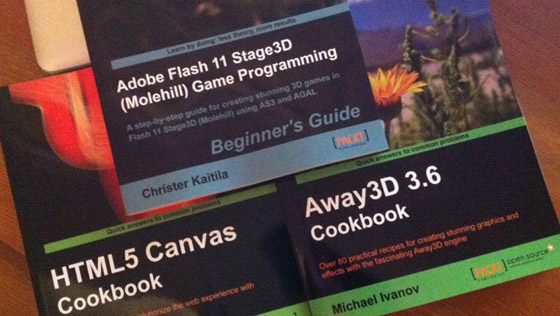
One of the perks of writing a book is that my publisher is always happy to send along titles that they think might interest me. So I was delighted when these three books landed on my doorstep recently.

The good news is that you don’t actually need to be writing a book or be a member of some secret cult to get your hands on some free stuff. The kind folk at Packt Publishing are always on the lookout for individuals who’d like to read some of their latest publications and give their honest opinion via their blog, Amazon, Slashdot etc.

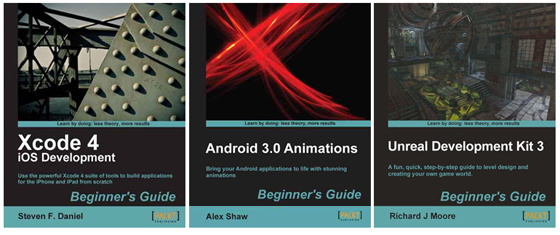
They just recently released the following three titles:

So if you think you’re up to the task and can turn-around a review within a week or so, then send me an email or catch me on Twitter and I’ll put you in touch with one of my secret contacts at Packt.

AIR for iOS Optimizations

I thought I’d follow-up my original post about Doppelgänger, and take some time to detail its implementation from a rendering perspective. There’s a lot that can be done to ensure your AIR for iOS apps hit their target frame rate, but these optimizations aren’t always obvious. I’ll also mention a few common pitfalls that leave many Flash developers scratching their head.

I hope you find the following useful for your own projects.

Test on the lowest common denominator

Test frequently on a physical device and use the lowest common denominator. For example, if you’re targeting both iPad’s then get your hands on an iPad 1. Don’t exclusively test on the iPad 2 and assume everything will be fine and dandy for those using previous generation hardware. You’ll be asking for trouble if you do.

Profile your app using Instruments

I know Flash Professional and ADT allow you to develop iOS apps using a PC, but if you’re at all serious then you really should get yourself a Mac. Why? Well you’ll be able to install the Instruments application, which allows you to analyse the performance of your app as it runs on a device.

Profiling tools are essential. Profile and optimize as you go.

Instruments was invaluable during the development of Doppelgänger. It allowed me to examine the app’s memory consumption, CPU usage and frame rate, making it very easy to spot areas in my code that were causing CPU spikes very early in the development process. My personal goal was to keep CPU usage at around 20%. It was easy to spot any spikes above this and quickly address these by optimizing either my code or graphics.

Don’t ignore spikes in CPU usage. Endeavour to fix all bottlenecks as early as possible.

Focus on rendering bottlenecks from the outset

Graphics rendering is often the single biggest bottleneck when porting Flash apps to iOS. Be prepared to flatten your display lists, simplify complex vector shapes, reduce the number of layers, and use bitmaps where appropriate. Also, perform incremental tests of your graphics assets and use Instruments to measure performance.

The original FLA for Doppelgänger was quite bloated. There was an insane amount of vector detail in many of the assets and an unnecessarily deep display list. I converted much of what was there to bitmaps to maximize render performance. I also tested many of the graphics assets in isolation by simply publishing individual test apps and profiling with Instruments. Once happy with the performance I’d layer more animations together and test again. This allowed me to quickly find any graphical assets that were going to hurt performance.

GPU rendering

AIR for iOS provides two choices of rendering engine – CPU mode and GPU mode. The CPU renderer is the same software renderer used by the desktop Flash Player. However, on iOS devices we can instruct Flash to offload much of this work to the GPU, which when used correctly, can accelerate rendering. Doppelgänger took advantage of GPU rendering to help maximise its frame rate.

Bitmap caching is your friend

When a display object changes in any way, or intersects the bounding area of some other display object that has changed, then it will need to be redrawn. Unfortunately redrawing complex vector shapes, text, or clips containing deeply nested display lists can be expensive.

Thankfully help is at hand in the form of bitmap caching. Put simply, bitmap caching stores a bitmap representation of a display object and uses the bitmap version whenever the object needs to be re-drawn. In many situations, drawing the bitmap representation to the screen is typically much faster than redrawing the original. Bitmap caching is particularly useful for objects that have translation (movement along the x- or y-axis) or transformation (scaling or rotation) applied to them.

Doppelgänger makes heavy use of bitmap caching to minimise the render time of each frame.

Bitmap caching is your enemy

Hold on! Didn’t I just say that Bitmap Caching was good? Yes I did. But only if it’s used correctly.

Many developers seem to think that activating GPU rendering and bitmap caching everything, will somehow guarantee a blindingly fast frame rate. This couldn’t be further from the truth. Misuse of bitmap caching will cripple your application. Even if you fully understand the ins-and-outs of bitmap caching, it’s all too easy to make a simple mistake that can undo much of your previous optimizations.

To benefit from bitmap caching you need to ensure that the cached bitmap does not frequently become invalidated. If invalid, the bitmap will need to be recreated by rendering its source display object and copying a bitmap representation to an off-screen buffer. To prevent this, don’t cache movie clips that contain timeline animations or container clips that have children that move relative to it.

I must admit that I slipped up here. Some of my initial tests on Doppelgänger performed poorly on iPad 1. I eventually tracked it down to the shutters that open and close between levels. I’d accidentally cached the container, which held both halves of the shutter. Essentially, as they opened and closed, every frame of animation was invalidating the cached version and forcing a re-cache. With the shutters consuming almost twice the height of the screen when fully open, re-caching was killing performance. This was fixed by simply caching each of the shutters’ child clips rather than the container.

To see the shutters in action, take a look at the gameplay video of Doppelgänger.

Bitmaps Vs. Vectors

Use bitmaps or vectors based on their strengths. It’s easy to get into the mindset of using bitmaps for everything because they tend to render faster. However bitmaps can consume significantly more memory and can quickly exhaust GPU memory when GPU Rendering is being used.
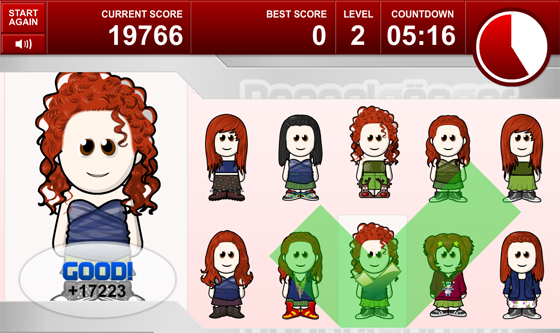

Content with a large bounding box and/or many animation frames might be better as vectors.

Doppelgänger uses a combination of both vector and bitmap assets. The timer’s ticking clock, for example, is a vector timeline animation. With a bounding area of 173×161 pixels and running for 90 frames, a series of bitmaps would simply have been too expensive (almost 10Mb of uncompressed data). The same was also true of the tick and cross animations, which both cover a fairly large area of the screen come the end of their animation cycles. And of course the WeeMee’s themselves are constructed from vector shapes, helping to reduce the app’s footprint and ensuring the WeeMee’s maintain their image fidelity when scaled.

Swap render quality where appropriate

Consider using a lower render quality setting. Bitmaps are relatively unaffected by this and it really can be hard to spot any differences for vector content that moves.

Doppelgänger constantly switches between low and high rendering quality during the lifetime of each game. This gives a massive performance boost, especially on the iPad 1. The drop in render quality is noticeable on the timer’s clock but I felt it was worth doing in order to maximize the frame rate. Each of the WeeMees are rendered into pixel buffers using the highest render quality setting just before each level begins. The bitmap representations of each WeeMee is then used during the level, which by this point has switched to the lowest render setting.

Conclusion

It can very much feel like smoke and mirrors some times, but it’s the final result that counts. These challenges aren’t specific to Flash and ActionScript either. Targeting mobile requires a little more effort than developing for the desktop. However, with some careful planning and an understanding of the constraints you’re working within, you should be able to make the necessary compromises to ensure a fun and engaging experience.

Packt Book Giveaway

It’s always good to learn new things, and to help you do just that, I’m putting three really great books by Packt Publishing up for grabs in my latest competition: Unreal Development Kit 3 Beginner’s Guide by Richard J Moore, Xcode 4 iOS Development Beginner’s Guide by Steven F Daniel, and Android 3.0 Animations Beginner’s Guide by Alex Shaw.

Here’s a little more information about each book.

Xcode 4 iOS Development Beginner’s Guide

  • Learn how to use Xcode 4 to build simple, yet powerful applications with ease.
  • Each chapter builds on what you have learned already.
  • Learn to add audio and video playback to your applications.
  • Plentiful step-by-step examples, images, and diagrams to get you up to speed in no time.
  • A practical guide to building your own fun and exciting iOS applications rapidly using Xcode 4.

Android 3.0 Animations Beginner’s Guide

  • The first and only book dedicated to creating animations for Android apps.
  • Covers all of the commonly used animation techniques for Android 3.0 and lower versions.
  • Create stunning animations to give your Android apps a fun and intuitive user experience.
  • A step-by-step guide for learning animation by building fun example applications and games.

Unreal Development Kit 3 Beginner’s Guide

  • Full of illustrations, diagrams, and tips for creating your first level and game environment.
  • Clear step-by-step instructions and fun practical examples.
  • Master the essentials of level design and environment creation.

So how do you go about winning one of these books? Well the rules are simple:

  1. First, decide which book you’d like then head over to its official page (links are at the top of this post) on the Packt Publishing website.
  2. Read over the book’s details then pop back here and add a comment to this page stating the book you’d like and one feature of it that makes you want to own a copy.
  3. Tweet a link to this page on Twitter. To make your life easier, here’s a tweet I made earlier.

Each winner will receive an eBook version of their chosen title. Feel free to submit an entry for more than one book.

The contest will close on December 4th at 11.59pm GMT. Winners will be contacted by email, so please remember to use your real email address when you add your comment.

Good luck!

The competition is now closed and comments have been disabled. The winners will be contacted.

Doppelgänger iPad Experiment

While we primarily develop our iOS apps at WeeWorld using Objective-C, we are open to alternative technologies. Here’s a little iPad game we put together as part of our evaluation of Adobe AIR. Doppelgänger is a port of a Flash-based browser game we released on WeeWorld last year and seemed like a natural fit for the iPad’s spacious touch-screen. It’s a simple game concept; the player has to race against the clock to spot the matching WeeMee from the crowd.

One of the major advantages of using AIR for this was that we got the full benefit of Flash’s vector rendering engine. With each WeeMee being randomly generated from a pool of 150 assets, it was essential we keep the final size of the app down. Using vector-based assets let us do that and also ensure we could scale the WeeMee’s without a loss of fidelity.

Everything went fairly smoothly but one feature missing from AIR that we found we really need is the ability to use native UI components and elements – it’s simply too much work to fake these things up in Flash. We got lucky with Doppelgänger but there are so many other similar mobile projects at WeeWorld that we simply can’t consider using AIR for because of this omission. Would be great to hear from Adobe if this is likely to change any time soon as it could really extend AIR’s reach.

So there you have it. A nice little prototype app that was put together in a very short space of time. The video shows Doppelgänger running on iPad 2, but it runs just as well on iPad 1 too.

Age of Defenders

Here’s a really nice browser-based Flash game that has just been ported to iOS and Android. Age of Defenders is a real-time multi-player tower defence game built with Flash and Adobe AIR. One of the really nice features of its online play mode is that you can do battle with other players across multiple platforms. I think you’ll agree that Age of Defenders looks gorgeous and it will also be available soon for Blackberry Playbook, which demonstrates the cross-platform strengths of AIR.

One thing that does concern me slightly, and it’s also the case with the excellent Machinarium, is that lower-end devices such as iPad 1 seem to be excluded from the party. This is a real shame as the iPad 1 is certainly no slouch and it does show that perhaps AIR isn’t quite there performance-wise yet. I’m personally hoping that Stage3D and the Starling framework will help in this regard when they eventually make it to AIR for mobile. However, for those with the right hardware, it’s a really nice gaming experience.

For an interview with the Age of Defenders lead developer, head over to Adobe Gaming Evangelist, Tom Krcha’s blog.

Life after Flash Mobile Player

I can’t say I was surprised by Adobe’s decision to kill the Flash Player for mobile, and I’m not entirely sure what all the fuss is about from the Flash community. After all, how many Flash developers out there were actively developing Flash content for mobile delivery? I bet it was a tiny percentage.

So why did Adobe’s mobile strategy for Flash Player fail so badly? Well to be honest. Apple’s decision not to support Flash on iOS pretty much killed Adobe’s plans from the outset. But it’s also clear that there wasn’t much enthusiasm for Flash on Android either. Performance across devices was variable and even Flash on high-end tablets seemed to struggle. So why was this the case?

Well, I think Flash was pretty much a victim of its own success in this regard. It’s clear Adobe spent considerable time and energy optimizing the Flash runtime for mobile but unfortunately that was just half the battle. There really isn’t much that can be done if the content being run by the player is bloated and not optimized for mobile, which unfortunately is the case for almost all SWFs out there.

Developers had simply become accustomed to creating content for desktop with almost no consideration for memory and CPU usage. What we ended up with was a web chock-full of SWFs that strangled the life out of every mobile device they ran on. A decade, or so, of not having to care about optimization had essentially set Flash up for a very bad fall.

But ultimately it wasn’t the performance that was the real killer. It was a simple issue of usability. Even content that ran well was almost impossible to use. With the tightly packed pixel density of mobile screens it was difficult to interact with buttons and links that were designed for pixel-perfect mouse clicks rather than fairly inaccurate finger taps. Of course, this isn’t a technology issue and certainly isn’t exclusive to Flash, however with so many Flash sites out there the problem was quickly associated with the platform.

By excluding Flash from iOS, Apple has effectively cleaned-up the web. Companies who wanted a mobile web presence were forced to ditch Flash and redesign their site. In the process this allowed them to create simpler, cleaner and ultimately more usable experiences. The success of the App Store did the rest. Games and applications that were once delivered via the browser had found a new home and another reason for having the Flash plugin had eroded away.

So while many will feel aggrieved, disappointed, and angry at Adobe’s decision to stop developing Flash Player for mobile, I think it’s hard to argue against it.

You’ll still be able to develop for mobile using Flash, but it won’t be for the browser – you’ll be targeting the Android Marketplace and Apple’s App Store instead. This makes perfect sense as this is the expected location for the sort of rich content that can be created using Flash. And let’s not forget that the Flash Player will continue on desktop where it has had so much success over the years. Many of the recent announcements, such as Stage3D, create exciting new possibilities and will hopefully be making their way to mobile soon too.

But for rich, interactive web-sites, it’s HTML 5 all the way! Right now, we have a clean slate. It would be easy to let the new JavaScript APIs provided by HTML 5 and the many great JavaScript libraries out there go to our heads. However, the last thing we need is all the same mistakes that were made with Flash being made with HTML 5. Experiment by all means, but when it comes to sites for customers and clients, let’s keep the web usable folks. Happy coding!

Review: Flash Development for Android Cookbook

With Android’s growing momentum, the Flash platform is perfectly positioned to allow developers to take advantage of its runtime to distribute content across mobile. Part of Packt Publishing’s popular Cookbook series: Flash Development for Android Cookbook by Joseph Labrecque offers over 90 carefully selected recipes for demonstrating mobile concepts related to Android and providing step-by-step practical examples.

While knowledge of ActionScript 3 is a requirement, even beginners should be able to grasp most of the concepts covered and easily lift the code examples straight from the book into their own projects. Impressively, the reader isn’t restricted to a single IDE. Instead many popular options are covered, with time spent in the opening chapter detailing how to configure Flash Professional, Flash Builder and the popular Powerflasher FDT. And while its focus is predominantly on pure ActionScript, the author also finds time to cover the Flex framework where appropriate.

With your development environment set-up, attention turns to your Android handset and the basics of device interaction. A series of concise and straightforward recipes highlight how to take advantage of multi-touch, gesture support, the virtual keyboard, and any physical keys found on the device. For anyone used to development for desktop, the content covered here will help get you in the correct mindset for targeting mobile.

Android devices also feature a wide range of sensors, and the book spends many chapters exploring those that are accessible from Flash. The geolocation sensor is covered and examples of it being used in conjunction with with a third-party API are given. Unfortunately the API chosen was Google Maps, which has now been deprecated. Nevertheless, it does illustrate the point and the techniques can easily be transferred to alternative services.

Valuable time is also spent covering the accelerometer, including how to detect changes in the device’s orientation. The difficult subject of screen layout is also addressed, with examples highlighting how to adapt your application’s layout in response to orientation changes. Some recipe’s demonstrating the strength of Flex for such tasks are also given, which is a useful insight for those who aren’t familiar with the framework.

Probably the most popular sensors on any mobile device is the camera, and the cookbook shows how to capture both still images and shoot video. As well as Flash’s traditional camera support where video is rendered directly within your application, the reader is also shown how to launch the device’s native camera app to perform these duties. When targeting Android, it’s important to deliver a consistent experience to the user by presenting them with familiar native apps for such tasks, and this is successfully highlighting. Loading images from Android’s Camera Roll app is another example of this.

Both video and audio, in general, are well catered for. In addition to capturing video, there are plenty of examples showing how to playback both local and remote video. Streaming video from a Flash Media Server is also included. There’s even room to explore microphone audio capture and the generation of sound at runtime. Unfortunately hardware accelerated H.264 video playback, which is new to Flash, arrived just a little too late to appear in the book, which is shame as it’s a great feature.

The format, allows you to dive right into any subject you like, with the majority of recipes being independent from one another. This makes Flash Development for Android Cookbook a resource worth keeping close at hand during development. You’ll find yourself frequently turning to it, either to serve as a reminder or to learn something new. While it might not always go into the greatest detail, what we have is a wide coverage of what Flash has to offer on Android. You’ll find that after each recipe you’ll be in a good position to go on and seek any further knowledge you require.

A very easy and concise read. I highly recommend this book to any Flash developers wishing to explore Android development.

You can purchase Flash Development for Android Cookbook from amazon and the Packt Publishing website.

Concurrency in Flash

One of the most frequent requests for the Flash runtime has to be the ability to leverage multi-core architecture using ActionScript. Well as you can see from the video below, concurrency is coming to ActionScript.

The hour long session covers quite a lot of ground and shows code examples of the new ActionScript worker API in action. Of course, multi-threading already exists in the runtime via the many asynchronous ActionScript APIs; plus Flash’s rendering pipeline is also multi-threaded. However, this will be the first time that developers will actually be able to execute their own code on background threads. It will also be possible to render to the display list from your threads, which is quite an exciting new feature.