Flash, Usability and the Mobile Web

A big congratulations to Adobe. Flash Player 10.1 is now available on the Android Market for Android 2.2 devices. Those planning to purchase new handsets such as the Motorola Droid 2 will be pleased to know that Flash Player 10.1 will come pre-installed allowing Flash content to work straight out of the box.

It’s a fairly modest list of devices at the moment with the Google Nexus One, HTC Evo 4G, HTC Desire, and Motorola Droid 2 initially receiving support. But as newer phones come to market and more existing handsets get upgraded to Android 2.2 we should start to see some significant Flash Player penetration.

I’ve had 10.1 installed on my Nexus One for a couple of months now and I’ve enjoyed having access to content that I wouldn’t normally be able to see on my phone.

I have noticed that the player’s performance has been criticised in some quarters and others have highlighted usability issues with existing content as reasons why everyone should ditch Flash/ActionScript for JavaScript.

Personally I believe these issues are mostly with the content rather than the Flash Player itself. I guess that’s always going to be the case when running content that was for the most part designed without mobile in mind and/or developed some time ago using obsolete versions of ActionScript.

The simple fact is there’s a lot of JavaScript heavy content out there that just doesn’t work well, or at all, on mobile either. I spent some time at the weekend trying out various JavaScript and HTML5 demos and found that most of them were completely unusable on my Nexus One (also tested on iPod touch and iPhone 4) due to either performance or usability issues (mostly both). That includes demos from popular HTML5 sites such as Canvas Demos and HTML5 Demos.

I’m certainly not trying to deride JavaScript or the excellent work that’s clearly going on in the community. I’m simply trying to add some perspective. It seems people are quick to criticise Flash when the exact same performance and usability issues on mobile have yet to be addressed by any other language.

I guess there’s so much Flash content out there that it makes it an easy target, but I for one am glad I now have a way of checking-out that content on mobile.

JavaScript and HTML5 will continue to march forward and replace many tasks that Flash was traditionally used for. My fear however is that developers will naively believe that using these technologies will somehow ensure their content will magically work on mobile. People need to realise that the user experience is very different on mobile and need to design with it in mind.

If we don’t then it won’t really matter what programming languages or virtual machines we eventually opt for.

I feel like I could take on the whole Empire myself

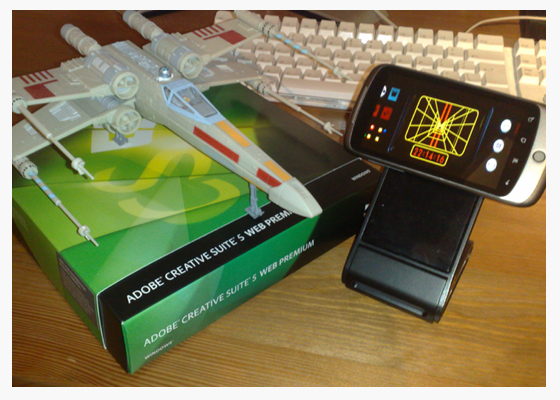
Wow! The last few days have been pretty amazing and I’d just like to thank everybody for the overwhelming positive response to my X-wing Targeting Computer app.

I’ve had desperate Star Wars geeks begging me to release it on the Android Market. Others have even resorted to threatening me with physical violence if I don’t 🙂

My original teaser post was a little vague – I honestly wasn’t expecting such a reaction – so I thought I’d take a little time to answer some of the questions that have been put to me via email or posted on the various sites out there:

Is it real or fake?
It’s real, although still in development.
Will you be releasing it on the Android Market?
Yes.
What version of Android will I need to run it?
Initially it will run on Android 2.2.
When will it be available?
It’s written using Adobe AIR for Android. I’m aiming to release the Targeting Computer app to coincide with the public release of AIR, which is itself still in development. Adobe has yet to announce a date but I’m hopeful that it won’t be that far off.
What about older versions of Android?
My priority is the Android 2.2 version but support for older versions of Android is a possibility.
What about an iPhone version?
What! You mean turn to the dark side? Actually I’m looking into it – wouldn’t want all you iPhone fans feeling left out.
Symbian, Blackberry, Windows Mobile?
Depends on time, resources and demand. If you want to see it on any of these platforms then please let me know. Come to think of it, it would probably look really good on the upcoming Nokia N8.
So are you a super nerd/geek yourself?
A girl I used to work with once said I reminded her of the Rain Man. I mistakenly took it as a compliment. Does that answer your question?
How much do you like Star Wars?
I paid to see the Phantom Menace nine times when it was originally released. I tried for a tenth viewing but unfortunately they stopped showing it at my local cinema before I had the chance. So yeah, I like Star Wars a lot. I prefer the original trilogy though.

I hope that has helped clarify things.

I’m sure a lot of you can now sleep more easily knowing that you’ll finally get the opportunity to know how it feels to be an X-wing pilot hurtling towards the Death Star’s exhaust port.

Until you do though, take it from me, it feels pretty damn awesome!

X-wing Targeting Computer

Update: You can find a post about the iOS remake of my X-wing Targeting Computer app here.

I’ve always wanted to be an X-wing pilot, helping the Rebel Alliance in their desperate struggle against the Galactic Empire. Unfortunately we haven’t yet acquired the technology in this galaxy to build reliable and safe X-wing fighters. However I wasn’t gonna let that put me off and embarked on a mission to bring my childhood fantasy one step closer to reality.

Thanks to Adobe AIR for Android and some guidance from the force I’ve constructed a GPS-enabled version of the Targeting Computer found within Luke Skywalker’s X-wing Fighter. So now you can at least pretend to be an X-wing pilot while you’re driving your car.

It’s really simple to use. Just lock in your target location and start driving until you eventually reach the exhaust port, er, I mean destination. Your distance to the target will be continuously updated as you drive and you can even hear radio chatter from your fellow pilots!

X-wing GPS-enabled Targeting Computer

When you’re not driving why not take your Targeting Computer to the office and use it as a clock. Yup, the Rebel Alliance thought of everything. Just switch it to Clock mode and mount it on your desk to impress the hell out of your friends. You can even set an alarm and watch as your Android phone closes in on the target time.

Now all I need is for George Lucas to spot this post and snap my idea up. George, we could both make a lot of money from this one. What do you say? 20-80 split? 80 percent for me and 20 for yourself. I think that sounds fair 😉

Many Bothans died to bring you this post.

Getting Started with AIR for Android

You’ve probably noticed my posts haven’t been as frequent of late. We’ll it’s all Adobe’s fault! You see I’ve been spending way too much time coding cool stuff for my Google Nexus One rather than blogging. Hold on, actually maybe that’s a good thing.

Anyway, I have managed to finish an AIR for Android app that I’ve been working on and will hopefully be able to post some videos of it in a day or so. In the meantime I thought I’d share some resources I’ve found extremely useful over the last few weeks.

I’m really enjoying AIR 2.5 for Android. Performance is good and the workflow makes coding and deployment easy.

If you haven’t already signed-up for the prerelease program then I’d recommend you do so by clicking this link.

Flash Camp Birmingham

If you missed Flash Camp Manchester then don’t worry. The guys at Flash Midlands have just announced that Flash Camp Birmingham will be held on Tuesday 7th September at Birmingham Library Theatre.

It’s the same deal as before – entry is free and an excellent selection of speakers will be attending including Mark Doherty (Adobe), Seb Lee-Delisle (Plug-in Media), James Whittaker (TweetDeck) and Mike Jones (Adobe). Oh and there will be a prize draw at the end of the day with goodies up for grabs including O’Reilly Books, Flash on the Beach tickets, Adobe Software and SecureSWF Software.

So do yourself a favour and register via this link: http://flashcampbirmingham.eventbrite.com/

Goodbye Symbian. Hello Android

This wasn’t an easy decision. After all I’m supposed to be a Nokia fan boy. However, after much deliberation my trusty wee Nokia 5800 has been put aside and I’m now using the Google Nexus One as my primary mobile.

Anyone who knows me will be well aware that I’m quite enthusiastic when it comes to the Symbian S60 operating system. It’s something I’ve grown comfortable with over the years and has always dictated what phone I get next.

I’ve been tinkering with Flash on mobile since Flash Lite appeared on the scene and Nokia have always done an excellent job of supporting Flash Lite on their mobile platforms. Flash is actually the reason I got my first Series 60 handset and it’s the reason why I’ve stuck with Nokia devices for so long.

However things are changing and Nokia don’t seem to be keeping up. Flash Player 10.1 and Adobe AIR 2.5 have now arrived on mobile and I’ve been desperate to explore both. Unfortunately there’s no sign of Flash Player 10.1 on any upcoming Nokia devices and they seem to be going with Flash Lite 4 in the short term rather than AIR.

So for the time being I’m moving over to Android, where I can get a much more complete web experience and also create cool Flash apps until my heart’s content.

This doesn’t mean I’ve become an overnight Nokia hater or anything. I will be keeping an eye out to see how things develop. The Nokia N8 looks like it could be quite interesting – It’s just a shame its doesn’t support Adobe AIR.

HP Windows 7 Slate

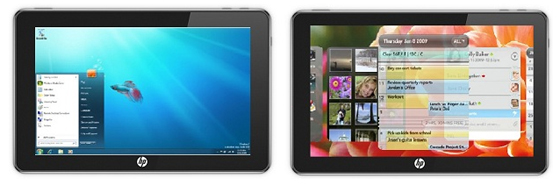
Does it look familiar? Of course it does, it’s the HP Windows 7 slate. It was certainly one of the most promising looking tablets on the horizon and I for one was a little upset when it looked like HP had pulled the plug on the project. Thankfully HP has just announced that it will arrive this fall/autumn.

HP WebOS Slate

It’s a nice looking device and I’m hopeful that they’ve ironed out the usability and performance issues that we were hearing about from those who got their hands on early preview versions of the device. Best of all is that the HP Slate will support Adobe Flash within the browser. Not sure if it will have AIR support but fingers crossed.

Here’s some more info.

Now what about a WebOS version? Now that would be interesting.

UPDATE: Looks like the slate is no longer a consumer products. Thanks to mnem for sending this link.

Flash Mobile Competitions

Flash competitions are like buses. You wait ages for one then three come along at the same time. But hey I’m not complaining and neither should you because three separate competitions simply means three more chances of winning something!

Adobe are really starting to push the Flash platform on mobile and along with its partners is looking for exciting game content that runs on either Adobe AIR for Android or Flash Player 10.1 for mobile. There are generous prizes on offer for each of the contests ranging from cash to software bundles.

Kongregate are offering almost $30,000 in prizes including Adobe CS5: Web Premium for the top 5 entries. Made for Mobile are offering over $20,000 in prize money spread across 105 (yes 105) winners plus Adobe CS5: Master Suite for the best 3 entries. And lastly (but certainly not least) is Cell Your Flash Game’s contest where the top 3 will win Adobe CS5: Master Collection and take a split from a cash pot of $4310. The next 147 (this isn’t a typo either) people will receive $100 each and a few will also receive Adobe Flash Professional CS5.

So what are you waiting for? Get coding and see what you can come up with. Oh and try not to bite off more than you can chew. The submission dates are actually quite tight.

Right all I need now is a great idea! Err,….. Damn! Oh well maybe next time 😉

Good luck!

Photobucket Mobile Site

here’s an interesting video showcasing the Flash Platform being used to deliver a mobile version of the Photobucket site. Before Flash Player 10.1 for mobile’s arrival the conversion effort to support video on mobile would have taken the Photobucket team several months. However by sticking with the Flash Platform the Photobucket team were mobile ready in a matter of days.

Vice President of Engineering Luke Swanson cited cost savings as a major factor. Using Flash removed the need to transcode and store multiple copies of their existing videos in different formats. It was also interesting to hear Software Engineer, Chris Nguyen describe the process of porting their Flash content to the mobile site as “pretty much plug and play”.

I decided to see what all the fuss was about and took the mobile Photobucket site for a spin on my Google Nexus One using Flash Player 10.1 beta 3. The results were pretty impressive although I still think there are a few usability niggles that need ironed out – scrolling on a page that was mostly consumed by a video was a little tricky.

I’m sure the Photobucket team will be looking forward to Flash Player 10.1 rolling out across more mobile devices in the not so distant future.

My “Write Once, Run Anywhere” Experiment

The Challenge

There’s much talk of creating content once with Adobe Flash and running it just about anywhere. Now anyone who’s had experience writing Flash content for mobile will know that it’s not that simple (all devices aren’t equal after all) but hey, I’m always up for a challenge and thought I’d try and port some web-based content to a wide range of handsets.

So what to port? Well I recently posted about the WeeWorld Fame Game, which we released a few weeks back, and thought that it would be an ideal candidate. Now I appreciated the sensible thing would be to plan with mobile in mind from the outset but I was genuinely interested to see how difficult it would be to take content that was designed primarily for the web.

Now if you can’t be bothered reading on – it’s quite a long post – or don’t have the time then why not just watch the video above where you can see the results of my little experiment. If you want to know more then read on.
Continue Reading